NodeMaven Review: Filtered Residential, Mobile, and ISP Proxies for Multi-Account Work

NodeMaven is a proxy provider that filters residential and mobile IPs before assigning them to users, reducing the share of weak addresses in a session. For multi-account work, this matters more than a large pool advertised on a landing page. An IP with a poor reputation can cause blocks or connection failures even when the browser profile is configured correctly.
This review covers NodeMaven's quality filter, proxy types, free diagnostic tools, and Scraping Browser. We will also connect NodeMaven to Afina Browser and verify the outgoing IP before opening an account.
| Parameter | Current NodeMaven offering |
|---|---|
| Proxy types | Rotating residential, mobile, and static ISP proxies |
| Pool | 30M+ residential and 250K mobile IPs |
| Geography | 190+ countries, with country, city, ISP, and ZIP targeting where available |
| Protocols | HTTP and SOCKS5; ISP proxies also support UDP |
| Sessions | Rotating or sticky sessions up to 24 hours for residential and mobile; static ISP proxies for 30 or 90 days |
| Billing | Per GB for residential and mobile, per IP with unlimited traffic for ISP |
| Provider metrics | 95% clean IP rate, 99.54% average success rate, and a claimed average response time below 0.6 seconds |
| Additional features | Traffic rollover, cashback up to 10%, quality compensation, and a referral program |
These specifications provide a useful overview, but the right proxy depends on the task. Rotation works for short distributed requests, sticky mode suits longer sessions, and static ISP addresses are worth considering for persistent profiles.
What Makes NodeMaven Different: IP Quality Filtering
NodeMaven checks residential and mobile addresses before they enter a customer session. Its filtering process considers:
- IP reputation signals
- whether the address appears on blocklists
- whether it meets the selected fraud score threshold
Addresses that do not meet the chosen quality level are filtered out. This is why the 30M+ figure needs context: the size of the pool matters, but so does the number of addresses that pass verification at the required moment.
The filter level affects the balance between pool availability and selection strictness. For sensitive account logins, start with stricter reputation checks. For broad public-data collection, assess not only the fraud score but also real response speed and the success rate on the target website.
NodeMaven currently reports a 95% clean IP rate and a 99.54% average success rate. These are provider-reported metrics, not independent test results or a promise that every website will accept every connection. A platform can still consider cookies, browser fingerprints, account history, and request behavior. That is why checking the IP score and proxy reputation remains useful before an important session.
NodeMaven also has a quality compensation procedure. If an eligible proxy is confirmed as blocked under the verification rules and support approves the request, the user may receive $1 in bonus traffic for that address. Compensation has a monthly limit, while trial and custom plans may not qualify. This is a formal claim-review process, not an automatic replacement for every slow connection.
Proxy Types and How to Choose
Start with the required session duration. Residential and mobile proxies share one traffic package and support rotation or sticky sessions lasting up to 24 hours. Static ISP proxies are purchased per address when the same IP is needed for weeks.
Residential and Mobile Proxies in One Plan
NodeMaven lets users switch between residential and mobile proxies without purchasing separate packages. Both types start at $2.20 per GB on eligible monthly plans, although the final rate depends on traffic volume and the billing model.
Residential addresses are a practical default for local research, ad verification, and distributed requests. Mobile proxies make more sense when a service expects carrier traffic or the task involves a mobile-first platform. Choosing mobile only because it seems more "trusted" is not enough. The network type should match the task. Our guide to mobile proxies and their use cases explains the difference in more detail.
Sticky mode can retain the same residential or mobile IP for up to 24 hours. Peer availability still affects the session, so verify the address again after a disconnect or profile restart.
Because residential and mobile proxies use the same traffic package, their main parameters are easy to compare in one table.
| Parameter | Residential | Mobile |
|---|---|---|
| Pool | 30M+ IPs | 250K IPs |
| Pricing | Shared package from $2.20 per GB | Shared package from $2.20 per GB |
| Sessions | Rotating or sticky for up to 24 hours | Rotating or sticky for up to 24 hours |
| Targeting | Country, city, ISP, and ZIP where available | Country, city, and ISP where available |
| Typical tasks | Research, ad verification, and distributed requests | Mobile-first platforms and carrier-network scenarios |
The difference is not a separate tariff but the origin of the IP and its intended use. Before choosing, check which network type the target service expects and whether one address must remain active for the entire session.

The screenshot shows the 20 GB monthly plan at $75 per month ($3.75/GB).
The shared package makes it possible to compare residential and mobile IPs in the same scenario without buying two separate plans.
Static ISP Proxies Paid per IP
NodeMaven ISP proxies provide a static residential address, unlimited traffic, and per-IP billing. Plans start at $2.33 per IP per 30 days; the final price depends on order size, term, and current offers. Both 30-day and 90-day plans are available. The product page lists 99.9% availability, a claimed average response time below 0.3 seconds, HTTP, SOCKS5, and UDP.
This model suits long-lived profiles, continuous monitoring, and high-traffic automation. There is no GB counter, but the address itself remains a critical dependency. For eligible ISP orders, NodeMaven includes one IP replacement in the dashboard and describes replacement or refund conditions when the fraud score exceeds the stated threshold.
Free Tools to Run Before Launching a Profile
Three core checks are available without registration:
- WebRTC Leak Test shows whether the browser exposes a different IP route
- DNS Leak Test identifies which DNS servers process the requests
- Anti-Bot Checker shows which protection systems the scanner detects on the target website
Run these tools after activating the proxy and configuring the profile so the results reflect the actual working session.
In headless Chrome, WebRTC showed the same route for HTTP and WebRTC. The result was "No leak detected." This is not a certificate for every future profile, only a check of one browser session and network route.

The standard DNS test made six requests, found one resolver in the exit region, and also returned "No leak detected." This check is useful after changing Secure DNS, enabling remote DNS for SOCKS5, or installing an extension that may bypass proxy rules. The public IP is hidden in the screenshot.

Anti-Bot Checker sends a regular request and reports signs of a CDN, WAF, CAPTCHA, and bot-management systems. In our test, example.com received an Easy rating: the tool detected Cloudflare CDN/WAF but did not find bot management. A clean result does not prove that protection is absent, because some systems appear only under specific browser or traffic conditions.

These tools complement an audit of WebRTC and DNS leaks in an antidetect browser, but they do not replace a final check in the specific Afina profile you plan to launch.
Run the checks in a consistent order. Verify WebRTC first, then DNS, and only then inspect the target domain's protection. This makes it easier to separate a routing issue from the website's own response. Repeat the tests after changing the proxy, Secure DNS, or profile network settings because an earlier result describes only that particular session.
Scraping Browser
NodeMaven Scraping Browser runs a cloud Chrome session through rotating residential or mobile proxy traffic. Its main capabilities include:
- creating a workflow from an AI prompt or template
- watching execution in Live Browser
- connecting Playwright or Puppeteer through CDP
- supported CAPTCHA handling and session recording
There is no separate charge for browser runtime. Users pay for rotating proxy traffic transferred during the session, including traffic from failed or blocked runs. This distinction matters when budgeting for large-scale data collection: a browser without a separate runtime fee does not make scraping free.
Live Browser, the console, session recordings, and structured output help investigate a failed run. They show whether the required page loaded, whether a CAPTCHA appeared, and at which step the workflow stopped.

The tool is useful for JavaScript-heavy pages, regional price checks, and multistep navigation that a basic HTTP request cannot complete. Results still depend on the target website's rules and technical protections.
Pricing, Cashback, and Quality Compensation
Residential and mobile plans currently start at $2.20 per GB. Unused traffic rolls over, and monthly plans may return up to 10% of consumed traffic as proxy credit. ISP plans start at $2.33 per IP per 30 days under the applicable offer and include unlimited traffic for the selected 30-day or 90-day period.
Choose the billing model according to the workload:
- per-GB billing is more convenient when usage varies and access to many addresses is required
- per-IP billing is easier to forecast for persistent profiles with high traffic volumes
The NodeMaven pricing page also lists bank cards and cryptocurrency as payment methods. Before purchasing, compare not only the starting price but also package size, validity period, rollover, and cashback conditions.
According to the quality program description, an eligible failed proxy may earn $1 in bonus traffic after evidence is submitted and reviewed by support. Confirm the current program rules and the stated limit of up to 20% of monthly usage before filing a claim. NodeMaven also offers a referral program with bonus traffic after the invited user makes their first eligible purchase. Check the current terms of both programs in the dashboard.
How to Use NodeMaven Proxies in Afina Browser
This is a standard proxy connection, not a built-in integration. Generate proxy credentials in NodeMaven, add them to Afina, assign the saved entry to one profile, and verify the outgoing address before starting work.
-
Open Proxy Setup in the NodeMaven dashboard and choose the proxy type that matches the task. Residential or mobile proxies work for rotation and sticky sessions, while a static ISP IP is better for a profile that requires a stable address. Set the location, protocol, and session mode, then copy the host, port, username, and password.
-
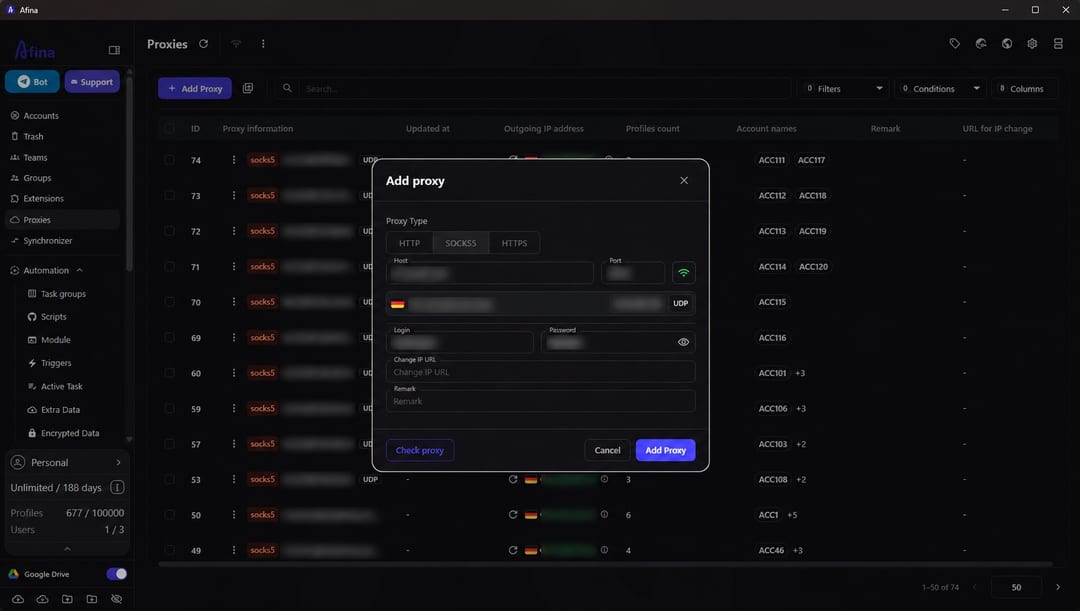
Open the "Proxies" section in Afina Browser and click "Add proxy." Select HTTP, HTTPS, or SOCKS5 according to the NodeMaven settings, enter the credentials in the corresponding fields, and run the connection check before saving. If Afina cannot connect, verify the protocol, port, and authentication details first.
-
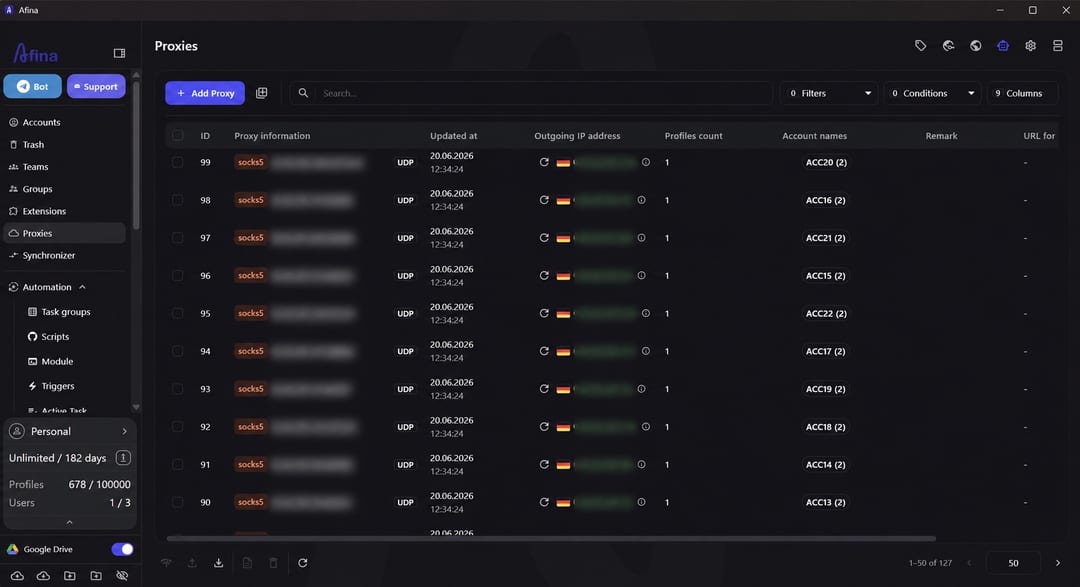
After saving, open the proxy list and refresh the connection check. In the "Outgoing IP address" column, Afina displays the actual address, country, and proxy status. The location should match the parameters selected in NodeMaven; a mismatch may indicate incorrect credentials or a different connection route. A green indicator confirms that the proxy responds during the current check.
-
Open the settings of the required Afina profile, go to the "Proxy" tab, and select the saved entry. One profile should use one consistent route: the IP country, time zone, and profile language should not contradict one another.
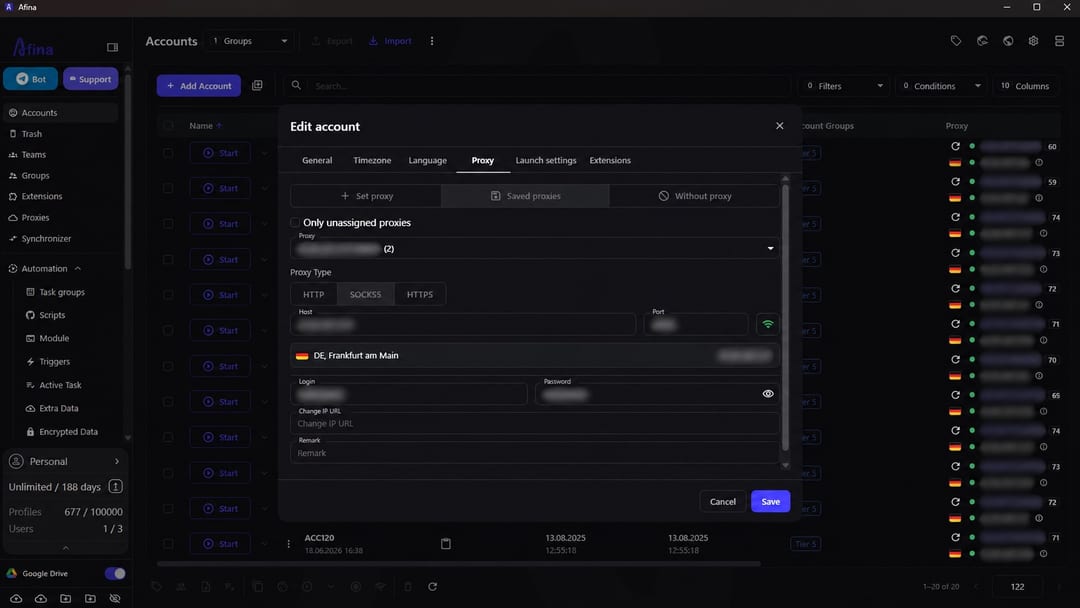
Each Afina profile stores its own cookies, cache, browser fingerprint, and proxy. Native UDP routing requires a SOCKS5 proxy with actual UDP support. The killswitch helps stop the profile if the proxy connection drops.
-
Return to the account list and confirm that the assigned address appears next to the required profile in the "Proxy" column. Use a separate sticky session or static ISP IP for every long-lived account. For larger sets, import proxies in bulk and then assign the appropriate entry to each account.
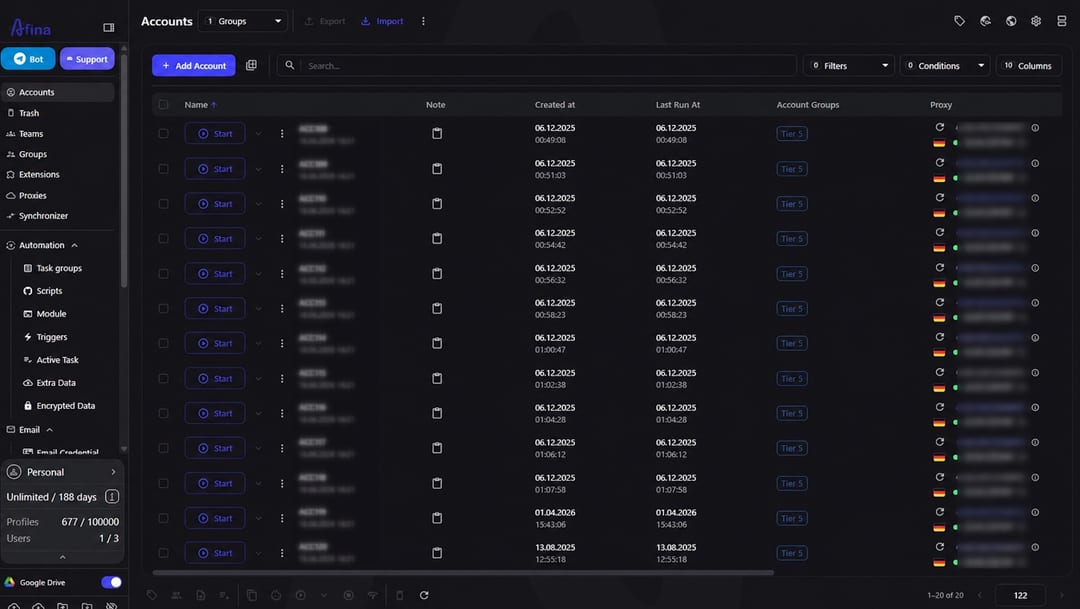


Before starting a working session, repeat the WebRTC and DNS tests and check the IP reputation. Run the checks again after replacing the proxy, losing a sticky session, or changing network settings. This material is provided for informational and educational purposes.
Is NodeMaven Worth Using?
NodeMaven is worth considering if you need residential and mobile proxies in one traffic package, configurable rotation, and IP reputation filtering. Choose the mode according to the task:
- rotating is more practical for short independent requests
- a sticky session suits work in one profile for several hours
- ISP proxies are worth comparing when a stable address is required for weeks
Before paying, verify the required location, plan conditions, and performance of a specific IP in your scenario. The success-rate and speed figures on the NodeMaven website are provider claims and do not guarantee identical results on every platform.
Promo code for Afina readers:
- AFINA35 - 35% off all proxy types
FAQ — Frequently Asked Questions
How Long Does a NodeMaven Sticky Session Last?
A residential or mobile sticky session can last up to 24 hours. The IP may change earlier if the peer becomes unavailable.
Can You Switch Between Residential and Mobile Without a New Plan?
Yes. NodeMaven includes both pools in one traffic package, and users choose the required type when generating proxy credentials.
Do NodeMaven's Free Tools Require Registration?
No. The public WebRTC, DNS, IP, and anti-bot checks are available without an account.
How Does NodeMaven Cashback Work?
Eligible plans return up to 10% of used traffic as proxy credit. The exact percentage depends on the plan and current account terms.
How Do ISP Proxies Differ From Rotating Residential Proxies?
ISP proxies retain one dedicated address and include unlimited traffic. Rotating residential proxies draw IPs from a broader peer pool and are billed per GB.