Proxies by Gigabyte or IP for 10-200 Profiles

The same set of browser profiles can cost $78 or $272 per month. The final amount depends on the pricing model: payment for traffic used or for assigned IP addresses. This article compares both options using Proxyma plans and calculates the cost for 10, 50, and 200 profiles.
The main variable in this calculation is the number of gigabytes used by each profile. A traffic package is often cheaper for short sessions and text-based dashboards. Video, media uploads, and long sessions quickly shift the balance in favor of per-IP pricing.
How Does Traffic-Based Pricing Differ From Per-IP Pricing
With traffic-based pricing, you buy a package of gigabytes and distribute it across any number of profiles. Dynamic residential and mobile proxies use this model. The number of available addresses is not the main constraint, but every page, image, or video loaded consumes part of the package.
With per-IP pricing, you rent a specific number of addresses for a fixed term. Traffic usage is not metered. A static ISP address is assigned to the customer for 30 days, making the monthly budget easy to forecast. Under the “one profile, one IP” model, costs rise with the number of profiles.
Our overview of the main proxy types explains address origins, rotation, and common use cases. For budgeting, remember one simple rule: low traffic consumption usually makes per-gigabyte pricing more economical, while intensive use increases the value of an unlimited IP.
Which Proxyma Plans Are Included in the Calculation
The comparison covers four product lines: dynamic residential, mobile, static ISP, and unlimited residential proxies. They serve different usage patterns, so the tables are separated by pricing method and subscription term.

Prices were current at the time of publication. Check them in your Proxyma account before purchasing.
Dynamic Residential Proxies for One Month
In this product line, the price depends on the included data allowance, while the number of ports remains the same. The table shows how the price per gigabyte falls with larger packages and helps you select the closest allowance without buying excessive capacity.
| Package | Traffic | Price | Price per GB |
|---|---|---|---|
| Startuna | 1 GB | $5 | $5.00 |
| Nebula Set | 10 GB | $30 | $3.00 |
| Protostar Set | 30 GB | $78 | $2.60 |
| Supernova Set | 80 GB | $160 | $2.00 |
| Pulsar Set | 160 GB | $272 | $1.70 |
The residential line offers the lowest price per gigabyte among metered packages. Mobile addresses are priced differently because their cost reflects the network type. A comparison based only on data allowance shows the budget difference but cannot replace a task-specific choice.
Mobile Proxies for One Month
Mobile packages suit scenarios in which a platform expects a connection through a carrier network. The same figures matter for a financial comparison: total allowance, package price, and cost per gigabyte. A separate table keeps this network-specific option distinct from standard residential addresses.
| Package | Traffic | Price | Price per GB |
|---|---|---|---|
| Mobile-1 | 1 GB | $5 | $5.00 |
| Mobile-5 | 5 GB | $23 | $4.60 |
| Mobile-10 | 10 GB | $43 | $4.30 |
| Mobile-25 | 25 GB | $100 | $4.00 |
| Mobile-50 | 50 GB | $150 | $3.00 |
With every mobile package, costs increase with traffic consumption. The next product line changes the billing unit itself: customers pay for the number of assigned addresses and know the monthly total in advance, regardless of data transferred.
Static ISP Proxies for 30 Days
ISP plans are easy to calculate when each profile needs a persistent address. The price per IP gradually falls as the package grows, while traffic remains unlimited. The table therefore links team size directly to a fixed monthly budget.
| Plan | Price | Price per IP |
|---|---|---|
| ISP-1 | $5 | $5.00 |
| ISP-3 | $13.5 | $4.50 |
| ISP-5 | $15 | $3.00 |
| ISP-10 | $29 | $2.90 |
| ISP-15 | $42.75 | $2.85 |
| ISP-20 | $56 | $2.80 |
| ISP-30 | $82.5 | $2.75 |
| ISP-50 | $135 | $2.70 |
| ISP-75 | $195 | $2.60 |
| ISP-100 | $255 | $2.55 |
| ISP-150 | $375 | $2.50 |
| ISP-200 | $480 | $2.40 |
| ISP-250 | $575 | $2.30 |
| ISP-300 | $660 | $2.20 |
| ISP-500 | $1075 | $2.15 |
| ISP-700 | $1470 | $2.10 |
Check the beginning of this product line carefully: ISP-5 costs only $1.50 more than ISP-3. If a task requires three addresses, the five-IP package provides a small reserve for almost the same price. With larger packages, savings come from the lower cost of each address.
Unlimited Residential Proxies
The unlimited line removes gigabytes from the calculation but introduces a high fixed cost for each period. Evaluate these options according to the required bandwidth and total data flow, not the number of browser profiles.
| Plan | Term | Price |
|---|---|---|
| Galaxys set-1 | 1 day | $265 |
| Galaxys set-7 | 7 days | $875 |
| Galaxys set-30 | 30 days | $2620 |
Plan cards are easiest to compare by unit price: one gigabyte or one address. On the Proxyma website, the product lines are divided by proxy type and subscription term.

Prices provide the basis for the calculation, but the result depends on actual profile behavior. Even the same number of accounts produces different loads when used with text dashboards or media content. The next step is therefore to estimate monthly data consumption.
How Much Traffic Does One Browser Profile Use
There is no universal figure, so the calculation uses three load levels. They distinguish short operations from daily work and resource-intensive sessions. These working assumptions allow the models to be compared on equal terms without presenting an estimate as a guaranteed norm.
| Load | Example workload | Monthly usage per profile |
|---|---|---|
| Light | account login, text dashboards, infrequent actions | about 0.5 GB |
| Medium | daily work on social platforms and marketplaces, image-heavy feeds | about 1 GB |
| Heavy | video, stories, media uploads, long sessions | 3 GB or more |
Measure the exact consumption with one typical profile. Proxyma provides 500 MB at no charge through the “Get 500 MB Free” button in the account dashboard. Connect a profile, complete a normal working day, and record the remaining allowance. Then multiply daily consumption by the number of working days and profiles.
How Much Do Proxies Cost for 10, 50, and 200 Profiles
For traffic-based pricing, the calculation uses dynamic residential proxies. The table shows the minimum cost of combining the listed packages to cover the required volume. If only one active package is available in the account dashboard, recalculate the budget using the nearest plan or the current terms for purchasing additional traffic. For address-based pricing, the corresponding ISP plan is used.
| Profiles | Residential, 0.5 GB per profile | Residential, 1 GB per profile | Residential, 3 GB per profile | Monthly ISP cost |
|---|---|---|---|---|
| 10 | $25 (5 GB) | $30 (10 GB) | $78 (30 GB) | $29 |
| 50 | $78 (30 GB) | $138 (50 GB) | $272 (160 GB) | $135 |
| 200 | $220 (100 GB) | $380 (200 GB) | $1084 (600 GB) | $480 |
For 10 profiles under light and medium loads, the difference is small:
- traffic-based pricing costs $25-30
- the ISP-10 package costs $29
At 3 GB per profile, static addresses are approximately 2.7 times cheaper.
For 50 profiles, the cost ratio depends on the load:
- under a light load, the residential package saves $57
- under a medium load, costs are almost identical at $138 versus $135
- under a heavy load, ISP costs approximately half as much
For 200 profiles, the difference between the pricing models becomes especially clear:
- at 0.5 GB per profile, the traffic package saves $260
- at 3 GB per profile, ISP saves $604 per month
It is easier to scale the budget according to actual consumption than the number of profiles created. For example, 50 profiles can produce two different scenarios:
| Parameter | Light load | Heavy load |
|---|---|---|
| Usage per profile | 0.5 GB | 3 GB |
| Total usage | 25 GB | 150 GB |
| Traffic package | 30 GB for $78 | Pulsar Set, 160 GB for $272 |
| ISP-50 cost | $135 | $135 |
| Difference | Traffic saves $57 | ISP saves $137 |
Under a light load, the 30 GB package also leaves a 5 GB reserve.
Unused capacity also affects the result. You pay for unused gigabytes even though they provide no value, while a package that is too small must be supplemented with another plan. Recalculate after changing the workflow, such as adding video, moving to heavier pages, or extending session duration.
When planning an order from Proxyma, first record actual monthly consumption and then select the nearest package with a small reserve. The comparison with ISP will then reflect the real workload rather than the largest allowance in the product line.
Mobile proxies are also billed by traffic, but each gigabyte costs more: 50 GB costs $150 compared with $138 for residential proxies. Choose them for tasks that require a mobile carrier address rather than the lowest possible price per gigabyte.

Absolute amounts show the scale of expenditure but do not provide a universal threshold. To apply the calculation to a different number of profiles or a new package price, compare the cost of one IP with the cost of each gigabyte actually consumed.
How Do You Calculate the Break-Even Point
The break-even point is the usage level at which both models cost approximately the same. It converts pricing tables into a per-profile metric and lets you recalculate the decision when prices change. Use the formula below for your project.
Threshold in GB per profile = price per IP / price per GB
| Profiles | IP price | GB price in the suitable package | Threshold |
|---|---|---|---|
| 10 | $2.90 | $3.00 | about 1 GB |
| 50 | $2.70 | $2.60-3.00 | about 1 GB |
| 200 | $2.40 | $1.70-2.00 | about 1.3 GB |
The formula provides a unit-cost benchmark, not an exact order total. The actual comparison point depends on the sizes of available packages and the rules for repurchasing or combining them.
If a profile consumes less than the threshold, calculate the traffic package first. When consumption exceeds the threshold, compare it with ISP. Between 1 and 1.5 GB, the difference is often small, so address stability and platform requirements determine the better option.
When Does an Unlimited Plan Become Cost-Effective
Unlimited residential proxies are designed for high traffic volumes. The figures below provide a theoretical reference based on the lowest unit price of $1.70 per gigabyte. The calculation assumes a linear traffic cost and does not account for traffic being sold in whole packages, so the real comparison point may differ:
- the 30-day plan for $2620 is theoretically comparable to approximately 1540 GB at $1.70 per gigabyte
- the 7-day plan for $875 is comparable to approximately 515 GB
- the 1-day plan for $265 is comparable to approximately 156 GB
These figures are not exact purchasing thresholds. The result depends on the available combination of whole packages and the terms for purchasing additional traffic. Such volumes are typical for teams engaged in large-scale data collection with continuously high bandwidth use. For standard account work, an unlimited plan usually provides excess capacity at an additional cost. Its advantage appears only with sustained consumption, not occasional spikes.
Which Factors Besides Price Affect the Choice
Price shows only part of the picture. Address stability, available geographies, and the validity period of the purchased package matter in daily work. These factors determine how well the selected model matches session duration, profile distribution, and the team’s operating regions.
- address stability. ISP keeps one IP for the full rental period. This is useful for accounts with regular logins. For dynamic proxies, the rotation period is configured in the proxy generator within the account dashboard
- geography. When purchasing ISP proxies, you select the country for the plan. A dynamic pool usually offers more geolocation options, making it suitable for tasks that require different regions
- validity period. Traffic packages cover one month. Buying a large allowance for a lower price per gigabyte makes sense only if the team can use it in time
- hybrid model. Core accounts can use ISP addresses, while one-off checks and data collection run through a traffic package. This combination avoids paying for static addresses where a persistent IP is unnecessary
No proxy type guarantees access to a platform or overrides its rules. Before assigning addresses, match the network model to the browser profile settings and test the connection. This material is provided for informational and educational purposes.
How Do You Connect Proxyma to an Afina Browser Profile
Afina stores the proxy inside the profile with its separate session. This assignment lets you test a specific connection before launching an account and prevents addresses from being mixed between working contexts. Our guide to how profiles, fingerprints, and proxies work explains this relationship in detail.
Before connecting, prepare the protocol, host, port, username, and password from your Proxyma account. The process takes a few steps:
-
open the active proxy in your Proxyma account and copy the connection parameters
-
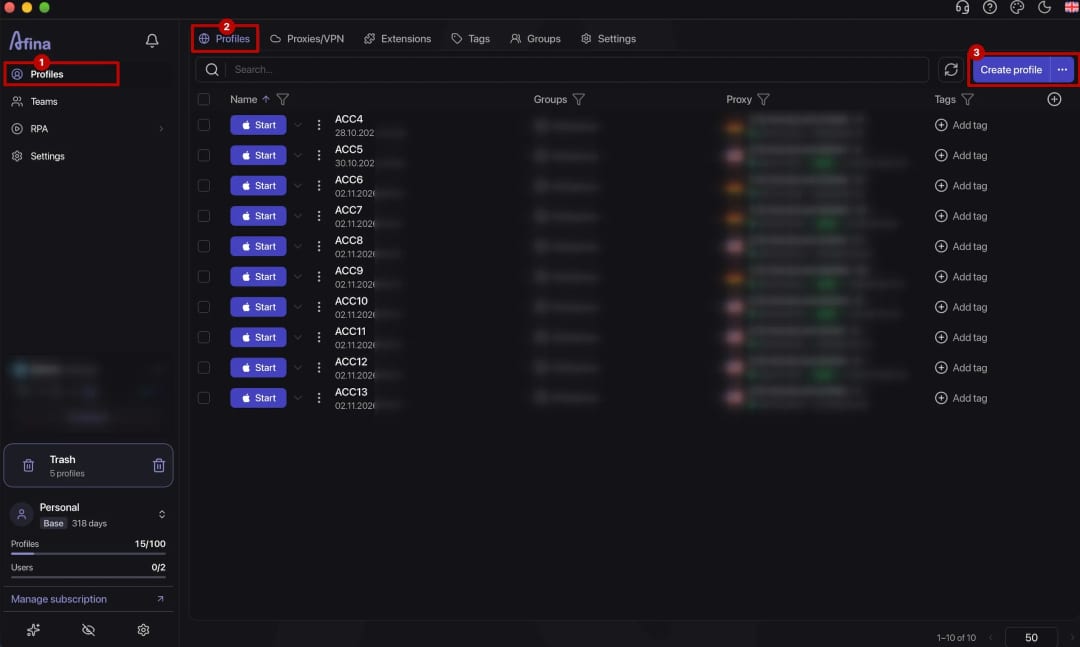
create a new Afina profile or edit an existing one
-
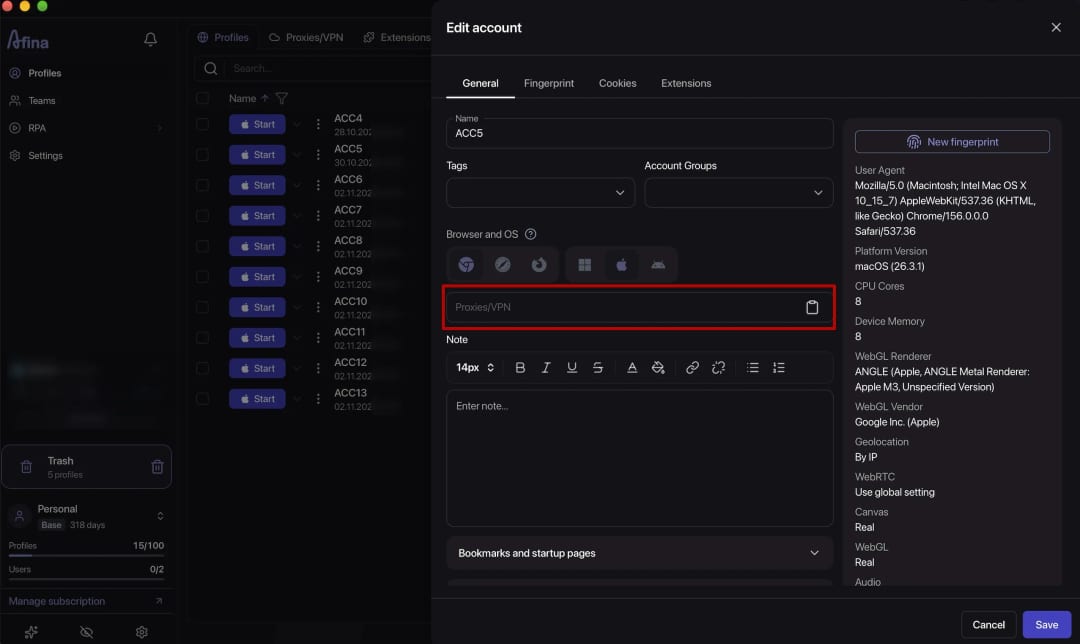
go to the “Proxy/VPN” field in the profile’s main settings
-
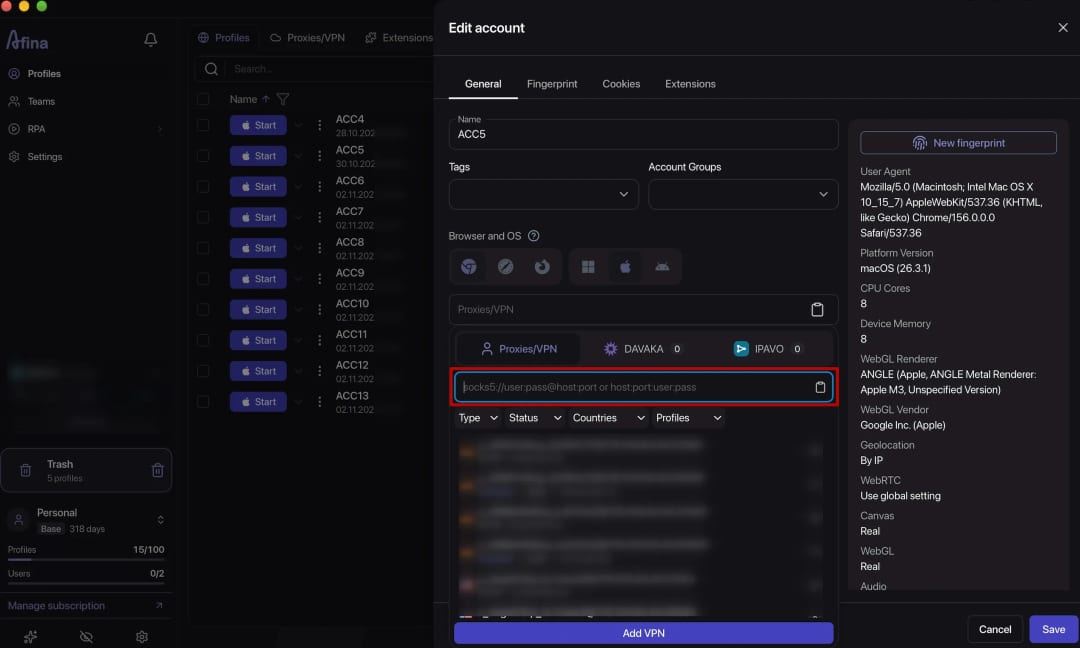
enter the host, port, username, and password in the connection string
-
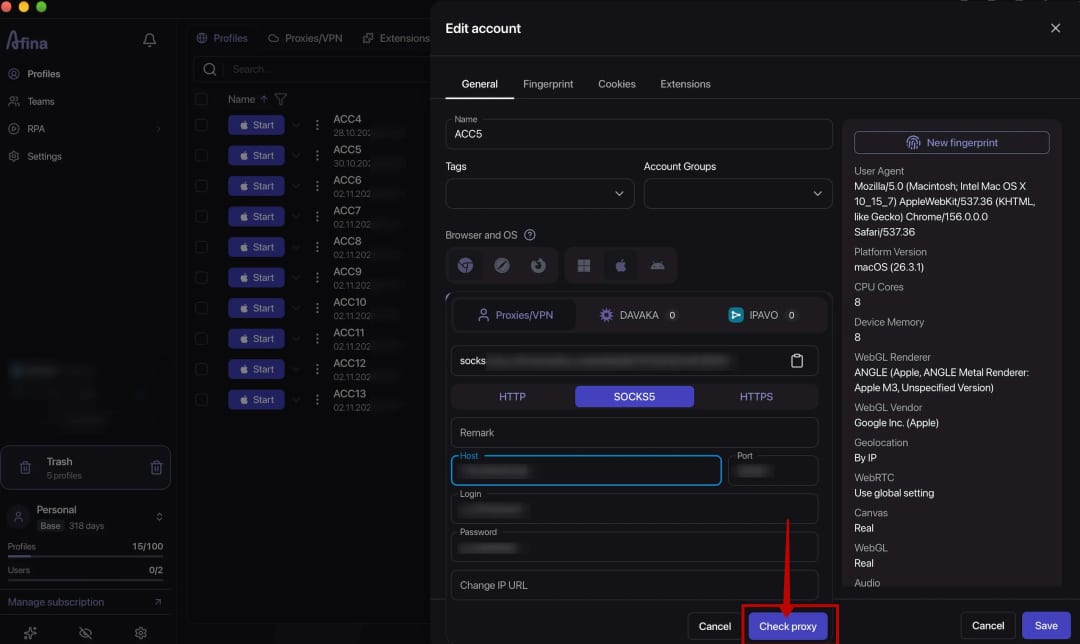
verify that the selected protocol and port match the Proxyma details
-
run the built-in connection test
-
enable the timezone and language settings based on IP, then save the profile
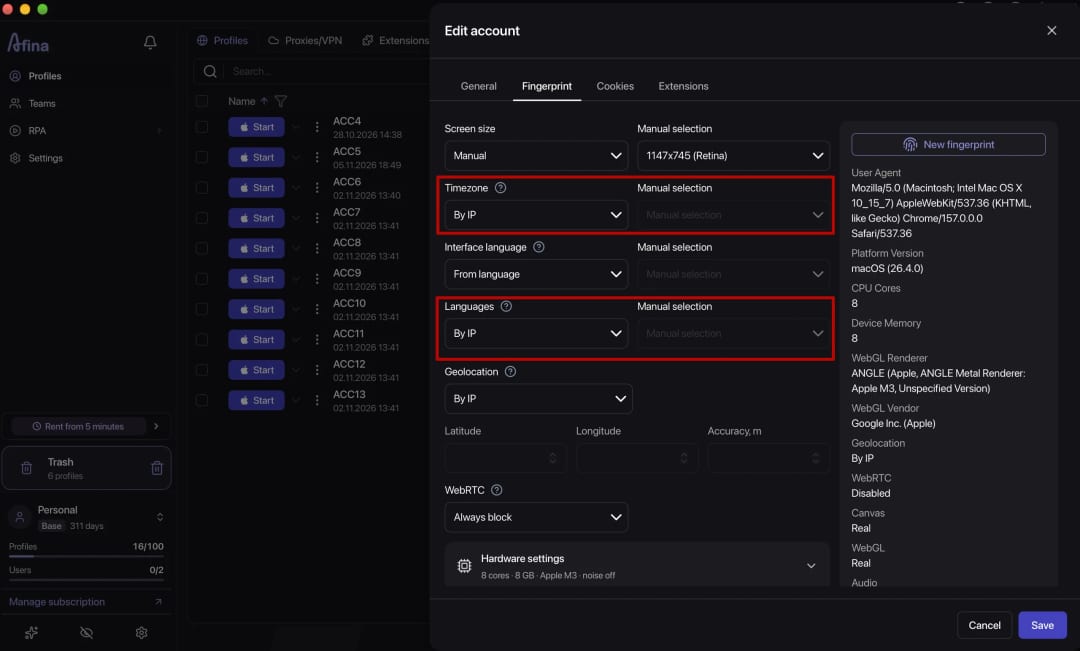


For ISP proxies, use the “one address per profile” model. With dynamic or mobile proxies, assign a separate endpoint to each profile so that working contexts do not share an exit address. Test the connection again in every profile after assignment.
How Do You Choose a Pricing Model
When monthly consumption is below 1 GB per profile, compare traffic-based residential packages first. Above 1.5 GB, static ISP usually becomes more cost-effective. Between these figures, consider session stability and the remaining traffic allowance for the month.
For 200 profiles, the difference between the models reaches $600 per month. If consumption is unknown, measure it with the free 500 MB allowance before choosing a package. A controlled test reduces the risk of purchasing excess traffic or overpaying for addresses.
How Do You Use the Afina Promo Code
The Afina promo code gives Afina Browser users a 15% discount on their first Proxyma purchase. It reduces the initial order cost but does not change the logic of the plan comparison. Enter the code in the “Enter promo code” field on the selected package card.
The discount applies to the first purchase, so it makes sense to use it for a planned large order. For example, ISP-200 costs $408 instead of $480 with the discount. Calculate subsequent months at full price to keep the recurring budget estimate realistic.
Choose a Proxyma Plan for Persistent Profiles
If the calculation favors per-address pricing, static ISP proxies provide a fixed IP for 30 days. Before paying, match the number of addresses to the number of profiles and apply the Afina promo code to the first purchase.
DownloadFAQ — Frequently Asked Questions
Is It Cheaper to Pay by Gigabyte or IP for 10 Profiles?
At up to 1 GB per profile, the totals are similar: $25-30 for traffic versus $29 for ISP-10. Under a heavier load, ISP becomes cheaper.
How Can You Measure the Traffic Used by One Profile?
Connect one profile to the trial 500 MB allowance and complete a normal working day. Multiply the daily consumption by the number of working days.
Can You Use One ISP Address for Multiple Profiles?
It is technically possible, but several accounts will connect through the same address. Separate IPs are normally used to keep working contexts isolated.
When Is It Cost-Effective to Buy Unlimited Residential Proxies?
Using a linear calculation at the minimum price of $1.70 per gigabyte, the 30-day plan is theoretically comparable to about 1540 GB of traffic. The actual comparison point depends on available package sizes and purchasing terms.
How Do You Calculate the Break-Even Point for Proxies?
Divide the price of one IP by the price of one gigabyte. The result shows the monthly consumption per profile at which the models cost the same.
Which Protocols Do Proxyma and Afina Support?
Proxyma supports HTTPS and SOCKS5. Afina supports HTTP, HTTPS, and SOCKS5.