Static or Residential Proxies for Social Media in 2026

Social media multi-accounting means working with several accounts, each of which needs a separate, consistently configured environment. Affiliate teams manage separate advertising accounts, agencies work with profiles for different clients, and e-commerce teams run projects across several regions.
Opening several browser windows is not enough. A platform considers the browser fingerprint, cookies, device settings, and network connection. When these elements change without a clear pattern, a user may face more verification requests, lose an active session, or encounter access restrictions.
A practical setup usually combines an antidetect browser with reliable proxies. Afina separates accounts into independent profiles, while IPFLY provides proxies that can be assigned to those profiles. The choice between a static ISP proxy and a rotating residential proxy depends on the task. Long-term account work needs stability, while regional research may require IP rotation.
Below, we explain how these proxy types differ, which option fits Facebook, Instagram, TikTok, and LinkedIn, and how the "one profile, one IP address" model works. All activity must comply with each platform's rules and applicable law.
Why an IP address matters for social media multi-accounting
An IP address and its approximate geolocation are among the network signals a platform uses to assess account activity. A team needs to separate its work environments and avoid random changes in network context.
Consider an agency managing several Facebook, Instagram, and TikTok accounts for different clients. If all of them connect through the same network, they share a network identifier. That alone does not trigger an automatic restriction. It does, however, make it harder for the team to keep client environments clearly separated and diagnose technical issues.
Sudden location changes create another problem. An account may usually open from one country and then appear in a distant region during the next login. The platform's security system evaluates that change together with other signals and may request an extra verification step.
Each work account should have a clear, fixed configuration:
- a separate browser profile
- its own browser fingerprint
- isolated cookies and session data
- a separate proxy when the workflow calls for one
- consistent location and network settings
This setup supports legitimate work, separates client environments, and reduces technical inconsistencies. It does not override platform policies or guarantee that an account will avoid verification.
How static ISP proxies differ from residential proxies
Static ISP and residential proxies are not completely separate categories. A static ISP proxy is usually a type of static residential proxy. For multi-accounting, the more useful comparison is between static ISP or residential IPs and rotating residential proxies.
When to use a static ISP proxy
A static ISP proxy uses an IP address registered to an internet service provider, and that address usually remains unchanged for the rental period. The conditions for retaining or replacing the address depend on the provider. This option suits regular access to one account, long sessions, and daily operations where the network context should not change without a reason.

A static ISP proxy has several practical characteristics:
- a fixed IP address without automatic rotation on every request
- an address registered to an internet service provider
- support for long-term work with the same account
- the option to assign a dedicated address to one profile
For example, an agency can assign a separate static ISP proxy to each Facebook Business profile. During daily work, the profile keeps the same address instead of switching between distant regions without a practical reason.
When a rotating residential proxy is appropriate
A residential proxy uses an IP address from a consumer internet provider's network. Depending on the provider's settings, the address may rotate automatically or remain fixed during a defined sticky session. A sticky session temporarily ties one IP address to a connection. Its duration depends on the provider, and the address may change after the session ends.
Rotating mode works well for regional research, public-page checks, and content monitoring. These tasks may require a broad IP pool or access from several locations, while a long authenticated session is not the main requirement.

Its characteristics differ from those of static mode:
- the IP changes by request count, timer, or another rotation rule
- addresses can be selected from different countries and regions
- the pool contains many residential IPs
- a sticky session can retain one address for a set period
Frequent IP changes are not suitable for every account. Consistency matters more for a long-term login, while geographic flexibility can be more useful when checking public content. The guide to proxy types and their use cases explains this choice in more detail.
| Criterion | Static ISP or residential proxy | Rotating residential proxy |
|---|---|---|
| IP use | One fixed address | Address changes according to rotation rules |
| Session consistency | Usually high | Depends on session settings |
| Geolocation selection | Depends on available addresses | Usually offers a wider location range |
| Long-term account work | Suitable | Less convenient with frequent rotation |
| Market research | Suitable for repeated checks in one region | Suitable for large-scale checks across regions |
| Typical use case | Account management and stable sessions | Regional research and public data collection |
The practical difference is straightforward. A static ISP proxy provides a consistent network environment, while a rotating residential proxy gives flexible access to different addresses.
Choosing proxies for Facebook, Instagram, TikTok, and LinkedIn
No single proxy type fits every social platform. The right choice depends on how the account is used, how long sessions need to last, and whether the task involves account management or public-content research.
Facebook: a stable environment for regular access
Teams use Facebook to manage business pages, advertising, and client accounts. If they regularly access the same accounts, a static ISP or static residential proxy helps keep the network environment consistent.
For client advertising accounts, separate access and fixed network settings matter. A rotating residential proxy is better reserved for a separate regional market analysis or public-content check, not a permanent authenticated session.
Instagram: consistency for long-running sessions
Content creators, agencies, and e-commerce teams use Instagram in different workflows. For ongoing account work, browser sessions should stay separate and network settings should not change at random.
Regular access benefits from a predictable session. If a team compares public Instagram pages across several countries, that is a separate research workflow where a rotating residential proxy may be useful.
TikTok: match the IP to the work region
Teams managing TikTok accounts in several countries need an IP that matches the target region. A static address in the required location is a better fit for a long-term work environment.
Checking the availability of public content and open trends across countries is a different TikTok task. In this case, the geographic coverage of a rotating pool matters more than the length of an authenticated session.
LinkedIn: predictable access to work profiles
Agencies and sales teams may regularly work with several LinkedIn profiles or client accounts. These tasks call for long sessions and a predictable network environment, so a separate static IP address is often more practical.
For LinkedIn, first determine whether the workflow involves regular work through authorized client access or research into public information across countries. In the second case, a residential pool can offer a wider location range, provided the data-collection method follows the platform's rules.
Why one profile should use one IP address
A useful starting model for multi-accounting is one dedicated IP address per account profile. It is particularly relevant when accounts belong to different clients, projects, or legal entities.

Suppose a team manages three Facebook accounts, two Instagram accounts, and two TikTok accounts. Instead of placing seven accounts in one environment with a shared network, the team creates seven profiles and assigns the appropriate proxy to each one.
| Browser profile | Account | Recommended network |
|---|---|---|
| Profile 01 | Facebook A | Dedicated static IP address |
| Profile 02 | Facebook B | Dedicated static IP address |
| Profile 03 | Facebook C | Dedicated static IP address |
| Profile 04 | Instagram A | Dedicated static IP address |
| Profile 05 | Instagram B | Dedicated static IP address |
| Profile 06 | TikTok A | Dedicated static IP address |
| Profile 07 | TikTok B | Dedicated static IP address |
This is an example configuration, not a mandatory rule for every company. Team requirements differ, and account work must follow each platform's policies.
The main benefit is environmental separation. Each profile retains its own browser data, cookies, and network settings. The team can maintain sessions more easily without mixing work across clients. In practice, we recommend testing one profile first and only then replicating the configuration. The social media multi-accounting guide covers other workflows.
How Afina and IPFLY work together
Proxies and an antidetect browser handle different parts of the work environment. A proxy sets the profile's network route and IP address. An antidetect browser isolates cookies and session data between profiles and lets the user configure browser fingerprint parameters separately.
Several proxies in a standard browser do not isolate cookies or local storage. Likewise, separate profiles without configured proxies do not receive different IP addresses automatically. Afina and IPFLY therefore cover complementary parts of the setup.
Afina isolates and organizes profiles
Afina creates independent browser profiles for multi-accounting. Each profile retains its own cookies, local data, network configuration, and browser fingerprint settings. An agency can separate profiles by client and perform daily operations in one workspace without repeatedly signing out of accounts.
IPFLY provides proxies for separate profiles
IPFLY offers rotating residential, static residential, and data center proxies. For long-term account work, the partner recommends considering static residential addresses because they are associated with internet service provider networks and do not change during a normal session.
IPFLY's offering includes static residential Comcast IPs in the United States for workflows that need a US static ISP address. Rotating residential proxies are designed for broader geographic coverage and access to different residential IPs.
To combine the two tools:
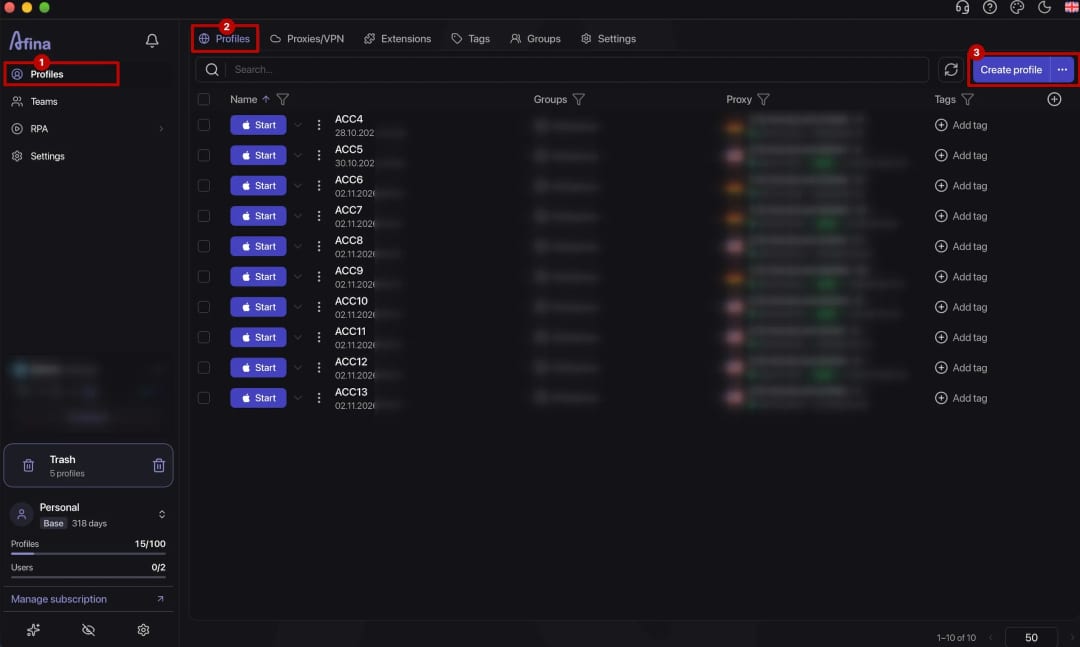
-
create or open an Afina profile
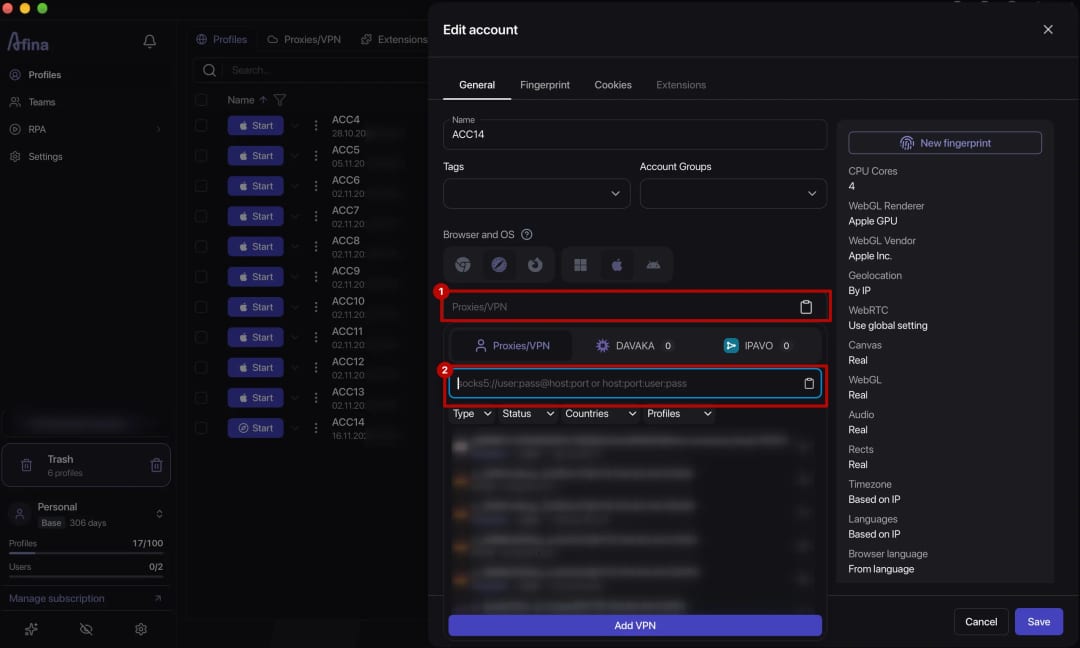
-
add the required proxy details
-
test the connection before launch
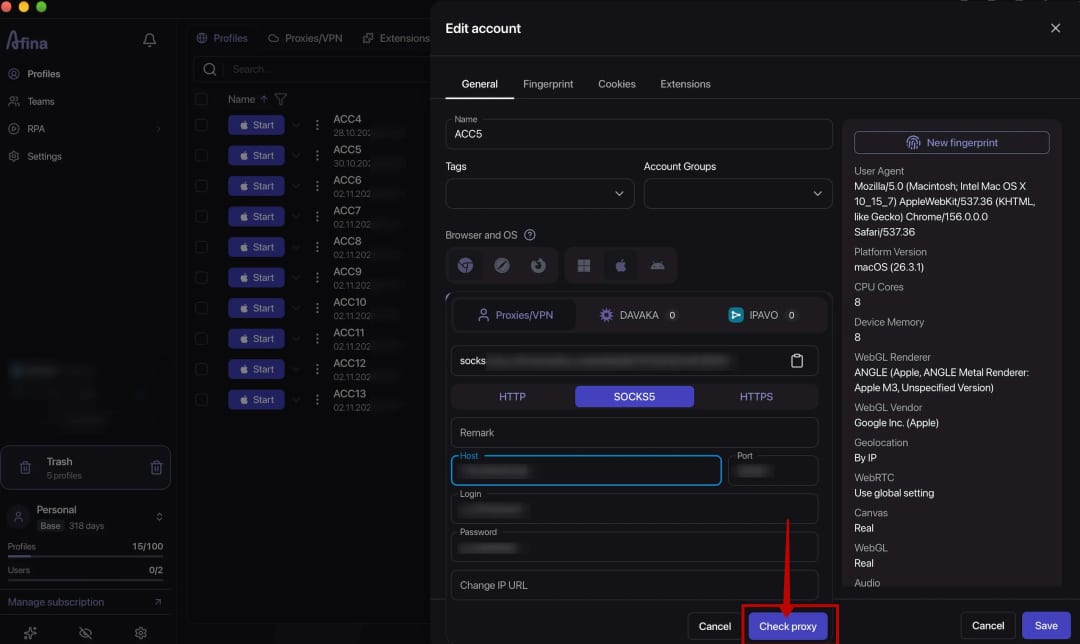


After the connection passes the test, launch the profile and confirm that the actual outbound IP address matches the selected country and region. With a static proxy, check whether the address remains the same after reconnecting. Also verify that WebRTC does not expose an unwanted local or other IP address outside the configured network route. The exact proxy settings and credentials depend on the IPFLY product.
Profiles can use IPFLY proxies based on the required location and session mode. Before scaling, test one configuration in a test profile and record which proxy is assigned to each account.
Mistakes to avoid in social media multi-accounting
Even a well-chosen proxy cannot fix a contradictory profile configuration. The most common problems involve shared addresses, frequent geolocation changes, and unrealistic expectations of the tools.
One IP address for unrelated accounts
When several client accounts operate through one connection, their environments are less clearly separated. For profiles used independently over long periods, consider assigning separate IPs.
Frequent changes between distant locations
Jumps between geographically distant regions create inconsistencies in access history. A stable address in a familiar location is usually more practical for ongoing account management.
Confusing static and rotating proxies
A static ISP proxy maintains a consistent connection, while a rotating residential proxy offers a broader address range. Match the mode to the specific task.
Ignoring the browser fingerprint and session
The IP address is only one part of the environment. Cookies, the browser fingerprint, time zone, and language also affect configuration consistency. Separate profiles keep this data from mixing across accounts.
Expecting guaranteed account safety
Neither a proxy nor an antidetect browser guarantees that a platform will never restrict an account. Social networks evaluate many signals and enforce their own rules. Teams need to follow service policies and use these tools for legitimate work.
Organizing multi-accounting with Afina and IPFLY
Consistent work starts by matching the task, proxy type, and profile. For regular account access, the partner recommends a static ISP or static residential proxy. For regional analysis and workflows that need a broader address pool, a rotating residential proxy may be appropriate.
Afina separates browser profiles, while IPFLY provides the network resources assigned to them.
Start the shared workflow by assigning the appropriate IPs and testing the configuration with one account. Afina users can also apply the promo code [CONFIRM: AFINA11 or Afina11] to receive a 20% discount on IPFLY services. This material is provided for informational and educational purposes only.
Explore IPFLY resources if your team needs static or rotating residential proxies for Afina profiles.
DownloadFAQ — Frequently Asked Questions
Why does an IP address matter for social media multi-accounting?
An IP address and approximate location are part of an account's network signals. A consistent configuration reduces random differences between sessions.
How does a static ISP proxy differ from a rotating residential proxy?
A static ISP proxy retains one address, while a rotating residential proxy changes IPs according to set rules. The first suits long sessions; the second works better for regional research.
Which proxy should you choose for long-term account work?
A static ISP or static residential proxy is usually suitable for regular access. It maintains a stable IP address for the profile.
Does every profile need a separate IP address?
One IP address per profile is a practical starting model for accounts belonging to different clients. The exact setup depends on operational needs and platform rules.
Does a proxy replace an antidetect browser?
No. A proxy defines the network route, while an antidetect browser isolates cookies and session data between profiles and lets users configure browser fingerprint settings.
Do proxies and antidetect browsers guarantee protection from restrictions?
No tool can provide that guarantee. A platform evaluates many signals and applies its own rules.