Safari Engine in an Antidetect Browser: How WebKit and JavaScriptCore Work in Afina for macOS

Native WebKit in an antidetect browser lets a profile use the WebKit rendering engine that powers Safari instead of merely replacing the User-Agent. However, matching other Safari characteristics depends on browser API implementation, privacy settings, and the network environment. Browser fingerprint checkers can supplement verification of these characteristics.
Teams working with Apple ID and App Store Connect have often opened these services in Chromium profiles with a spoofed Safari User-Agent. The User-Agent changed, but Blink and V8 still processed the page. This created a mismatch between the browser being declared and its technical characteristics.
Afina for macOS can create a WebKit profile: WebKit renders pages, while JavaScriptCore executes JavaScript. Below, we explain what the User Agent transmits, how two engines work in one client, and what to consider in the network stack.
What the Browser Engine Is and Why User-Agent Does Not Change It
The browser engine determines how website code becomes a page and how its scripts execute. User-Agent has a different role: it is an identification string in a request, not an engine switch. Spoofing a Safari User-Agent in Chromium changes what is reported to the server, but it does not turn Blink into WebKit.
Rendering Engine and JavaScript Engine
A browser environment includes rendering and JavaScript execution components. Rendering components process HTML and CSS, build the document structure, calculate styles, and display the page. The JavaScript engine runs code that responds to user actions, loads data, and changes the interface without a reload.
Chromium uses Blink for rendering and V8 for JavaScript execution. Safari uses WebKit to display web pages and JavaScriptCore (JSC) to execute JavaScript. An Afina WebKit profile uses WebKit to display pages and JavaScriptCore to execute JavaScript.
Implementation differences appear in API support, individual function behavior, and browser fingerprint layers.
What User-Agent Transmits
User-Agent is sent to the server in an HTTP request and is available to the page through navigator.userAgent. An example Safari 26.0 User-Agent string for macOS:
Mozilla/5.0 (Macintosh; Intel Mac OS X 10_15_7) AppleWebKit/605.1.15 (KHTML, like Gecko) Version/26.0 Safari/605.1.15
The string contains platform, WebKit, and Safari identifiers, but these values do not necessarily represent the actual browser environment precisely. It does not describe all browser behavior. For example, a website can separately check whether an API is available or receive network signals that are absent from User-Agent.
Why UA Spoofing Leaves Chromium as Chromium
Chrome allows the User-Agent to be overridden for compatibility testing. The browser still works internally as Chrome: Blink performs rendering, and V8 processes scripts. For Apple services, the practical task is therefore to align the string with the actual engine, not simply write the word Safari. For teams working with multiple accounts, this approach complements an Apple Developer account management workflow, but it does not replace profile, IP address, and session separation.
An identical-looking page does not prove an identical browser environment. Different engines may support new APIs differently, handle JavaScript edge cases differently, and expose different properties to the page.
User-Agent Mismatch: Where Technical Signals Differ from the Declared Browser
A User-Agent mismatch occurs when a browser identifies itself as one product while its behavior corresponds to another engine. Antifraud systems may consider this mismatch alongside the IP address and user actions. It is one risk signal, not an automatic reason to block an account.
Layers That Can Reveal the Engine
A page can check CSS property and JavaScript API support through feature detection. Depending on the browser and request context, the server may also receive Client Hints, including headers in the Sec-CH-UA family. Their composition and availability vary, so these headers alone are not universal proof of Chromium use. At the network layer, a server or protection service can analyze a TLS fingerprint such as JA3 or JA4 and the ratio of HTTP versions.
Together, these signals provide a broader technical context. navigator.userAgent alone does not explain how the engine executes code, which APIs are available, or how the client establishes a secure connection.
For example, a server may receive a Safari User-Agent while other technical characteristics indicate Chromium. This does not reveal a person's identity or prove a violation. Still, a risk assessment system may use the combination as a reason to request another login, device confirmation, or an additional check. A specific response cannot be predicted without the platform's documentation.

The diagram shows the core difference without making assumptions about private platform algorithms. WebKit and JavaScriptCore remove the mismatch at the main engine level, but they do not guarantee complete Safari equivalence across browser APIs, privacy settings, and network characteristics.
For an additional check, open Fingerprint Playground in the running WebKit profile and wait for the analysis to finish. Compare the detected browser and operating system, IP address, confidence score, and available Smart Signals with the profile's actual configuration.

Evaluate the Visitor ID and confidence score together with the other signals.
Why This Is a Risk, Not a Guaranteed Ban
Antifraud evaluates a set of characteristics. The IP reputation, geolocation changes, login frequency, session history, and sequence of actions may matter alongside the engine. The weight of each signal is part of a service's internal logic, so assigning fixed undocumented rules to Apple, Google, or Meta would be inaccurate.
If a profile identifies itself as Safari, native WebKit removes the obvious mismatch between the browser name and the pair of engines. It does not remove the need for a suitable proxy, a stable network, and consistent user behavior.
Two Engines in One Client: How Afina Combines Chromium and WebKit
Afina for macOS lets teams separate workflows by browser engine. A WebKit profile is useful for checking Safari compatibility and working with Apple services in that environment. Google Play Console, Meta, and Google Ads can remain in familiar Chromium profiles within the same client.
Tasks That Suit WebKit
WebKit is useful when the Safari web environment needs to be reproduced, such as when working with Apple ID or App Store Connect or checking page behavior in WebKit. These services do not require WebKit for every workflow. If a team runs several Apple projects, each separate session still needs its own profile and a predictable network configuration.
Tasks That Can Stay on Chromium
Chromium remains a practical option for Google Play Console, Meta, and Google Ads. There is no need to move the whole team to one engine. It is more practical to choose the engine for the task and retain the familiar workflow where the Safari environment is unnecessary.
Platform Limitation
The WebKit profile is available in Afina for macOS.
| Task | Recommended profile engine | Why |
|---|---|---|
| Apple ID | WebKit | allows the service to be checked with WebKit and JavaScriptCore |
| App Store Connect | WebKit | allows compatibility with the Safari environment to be checked |
| Google Play Console | Chromium | suits workflows that do not require Safari compatibility testing |
| Meta | Chromium | retains the existing workflow without moving to WebKit |
| Google Ads | Chromium | suits tasks that do not involve testing in Safari |
The table does not mean that one engine is better than the other for every website.
How to Create a WebKit Profile in Afina for macOS
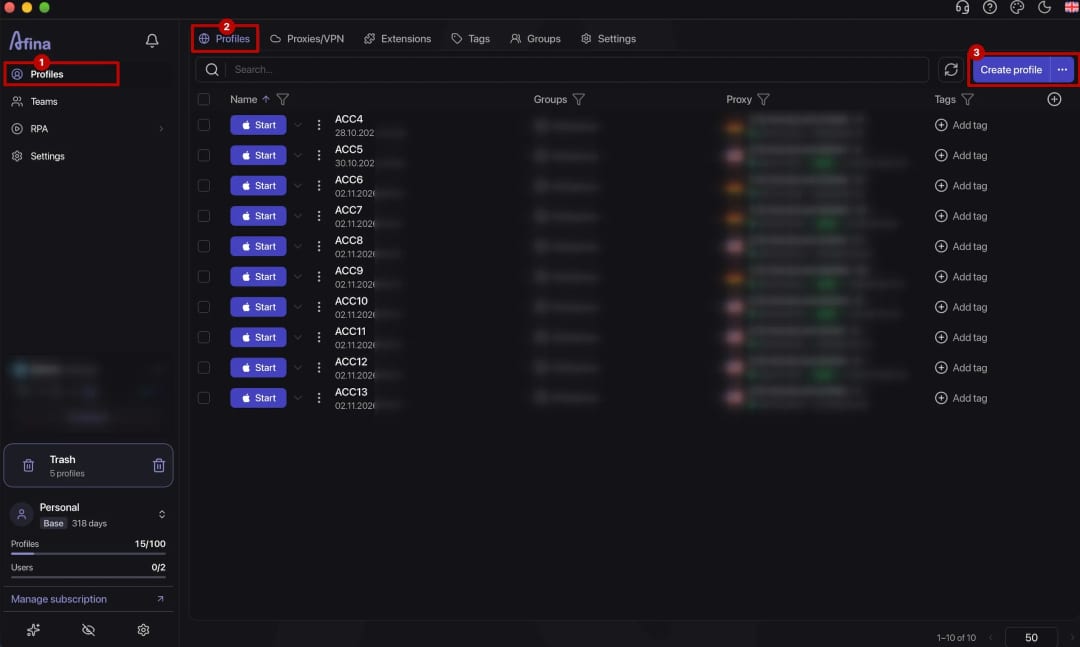
The profile is created in the macOS version of Afina. Configure it in the following order:
- open Afina on macOS and start creating a new profile
- select Safari
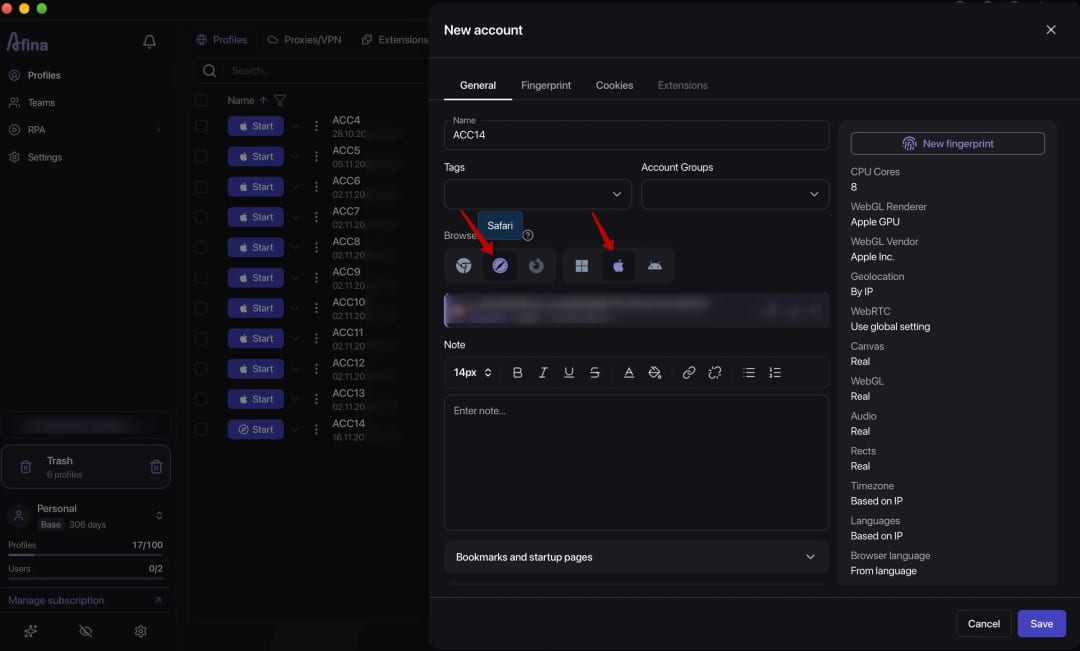
- configure the profile parameters for your workflow
- add a proxy for the workflow. If QUIC, HTTP/3, or UDP WebRTC traffic must pass through SOCKS5, verify UDP ASSOCIATE support on the proxy server and the profile's UDP routing implementation, and consider how UDP passes through SOCKS5
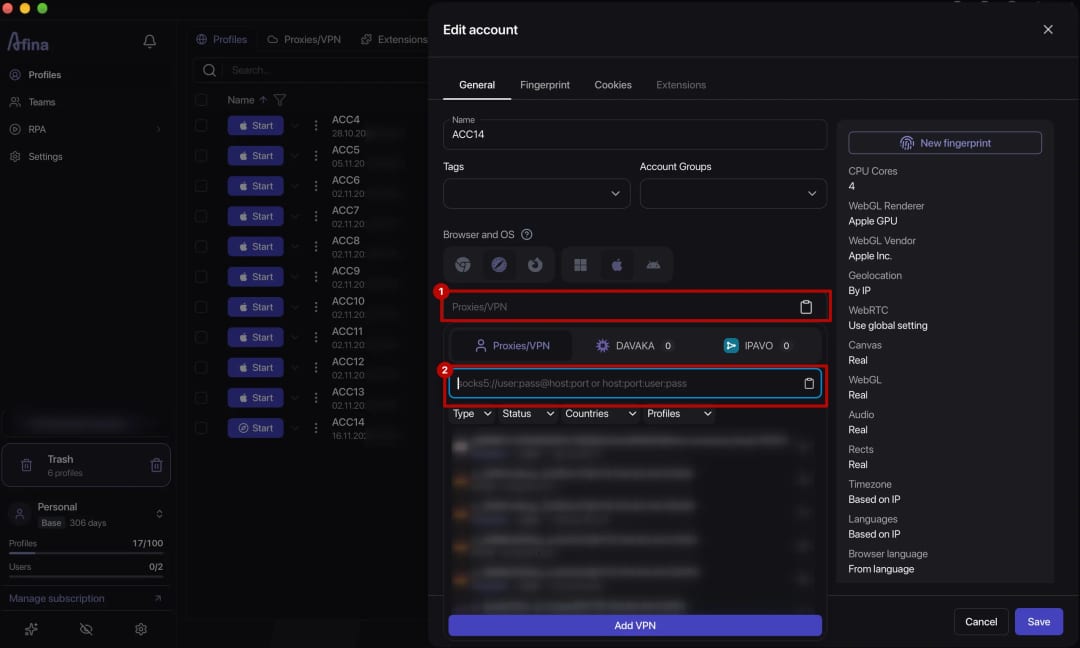
- launch the profile and open the required Apple service
- check support for relevant browser APIs and engine behavior, the public IP address, and the WebRTC result before starting work


Afina's New Network Stack: UDP, QUIC, HTTP/3, and WebTransport
Afina's network stack supports UDP, QUIC, HTTP/3, and WebTransport. There is no separate toggle: if the profile's SOCKS5 proxy actually supports UDP, these protocols are enabled automatically. Whether a particular connection uses HTTP/3 also depends on the website server.
TCP and UDP
TCP establishes a connection and provides ordered byte delivery. UDP transmits datagrams without such a stream, while a higher-level protocol such as QUIC implements reliability controls when needed.
QUIC and HTTP/3
QUIC runs over UDP and integrates secure connection establishment with transport parameters. When a QUIC connection is established, the client and server negotiate cryptographic and network parameters in one process, reducing the number of separate stages before data transfer.
HTTP/3 uses QUIC to transmit HTTP requests and responses over UDP. If HTTP/3 is unavailable, the browser may establish a connection over HTTP/2 or HTTP/1.1 using TCP, provided the client and server support the alternative protocol and the route is available. For other protocols, fallback support depends on their implementation.
A fallback to TCP is not always visible to the user. The page may open normally over HTTP/2 even though the planned QUIC route did not work. A successfully loaded website therefore does not prove that UDP works through the proxy. Diagnosis requires browser network tools or a separate test that reports the actual connection protocol. When a team checks a new proxy configuration, it is useful to record the result with the engine version and test time.
Saving the results makes checks after an Afina, WebKit, or proxy server update easier. Without earlier results, it is difficult to determine whether the browser engine, the website, or the provider configuration changed.
WebTransport
WebTransport gives web applications low-latency bidirectional streams and datagrams. WebTransport over HTTP/3 uses QUIC; specifications also define WebTransport over HTTP/2, but support depends on the specific implementation. In Afina, WebTransport works automatically if the profile's SOCKS5 proxy supports UDP and the website server supports the protocol.
| Protocol | Transport | Where it is used | Proxy requirements |
|---|---|---|---|
| HTTP/1.1 | TCP | web requests and responses | TCP connection support |
| HTTP/2 | TCP | multiplexed web requests | TCP connection support |
| HTTP/3 | QUIC over UDP | web requests over QUIC | UDP transmission to retain HTTP/3 |
| QUIC | UDP | secure transport with streams | UDP support across the route; routing through SOCKS5 requires UDP ASSOCIATE on the server and a corresponding profile implementation |
| WebTransport | HTTP/3 over QUIC; implementations over HTTP/2 are possible | bidirectional streams and datagrams | HTTP/3 requires an available UDP route; HTTP/2 support depends on the client, server, and proxy |
| WebRTC | primarily UDP; TCP or TLS through available relays and fallback routes | media and data exchange | proxying for the required transport and IP verification |
The network stack should be evaluated as a route from the profile to the server. If one segment does not support UDP, QUIC and HTTP/3 may remain unused even when the engine exposes the relevant API.
UDP Traffic and WebRTC Through the Profile Proxy
Sending UDP traffic through SOCKS5 requires support for the UDP ASSOCIATE command on the proxy server and corresponding routing in the browser profile. The actual QUIC and WebRTC route must be confirmed with a test. SOCKS5 defines UDP support, but a specific provider may not implement it. This matters for QUIC and WebRTC scenarios that use UDP, while WebRTC may also use other routes, including TCP or TURN. In Afina, specify the proxy type according to the configuration format: without the socks5:// prefix, the address may be interpreted as an HTTP proxy.
Why UDP Requires SOCKS5 With UDP Support
HTTP and HTTPS proxies usually handle TCP connections. SOCKS5 defines the UDP ASSOCIATE command, through which a client receives a relay address for datagrams. A plan labeled SOCKS5 does not by itself prove UDP support, so verify the capability with the provider and confirm it by testing after connection.
If UDP is unavailable, HTTP/3 will not work through that route. The website may remain available over TCP, but that does not confirm QUIC operation. Alternative WebRTC routes need to be checked separately.

The diagram shows two routes. A SOCKS5 proxy with UDP support carries both TCP and UDP protocols. An HTTP proxy blocks UDP, so the connection either falls back to TCP or fails.
WebRTC and the Public IP Address
WebRTC establishes direct or relayed connections for media and data. ICE gathers connection candidates, while STUN helps determine the external IP address and port visible to the STUN server. The results depend on the network configuration and NAT mechanisms. WebRTC may therefore report an IP that differs from the HTTP proxy address.
In Afina, WebRTC traffic can be routed through the profile proxy. The setting still needs to be tested rather than assumed to work simply because the proxy has been saved.
Required Check
The check should confirm that the network route is consistent. Consider the ICE candidate types: an address that differs from the proxy IP does not always indicate a leak. Determine whether WebRTC exposes an unwanted address outside the intended route. A complete procedure is available in the guide to checking a profile for WebRTC, UDP, and QUIC leaks; this article uses three control points.
- compare the profile's public IP address with the proxy address
- inspect the IP addresses found through WebRTC and confirm that they do not expose unwanted network addresses outside the intended route
- check which transport the website actually used and record any fallback
Repeat the check after changing the proxy, switching networks, waking the Mac from sleep, or updating the engine. These events may rebuild network interfaces and the set of ICE candidates, so an earlier result no longer describes the current session.

Teams should record the check time, proxy type, and WebKit version in one log.
When a WebKit Profile Is Needed and When Chromium Is Enough
Choose the engine based on the specific task, not the platform name. Check three criteria in order:
- purpose: if you need to test page rendering, JavaScript, or web features specifically in the Safari environment, select WebKit. If not, Chromium may remain in use
- compatibility: open the required website functions in the selected profile and check whether the installed engine version supports the necessary APIs. A service belonging to the Apple ecosystem does not by itself make WebKit mandatory
- session and network stability: check the website, actual connection protocol, public IP address, and WebRTC. Record the engine version and proxy settings so the test can be repeated after an update
If the website works correctly in Chromium and Safari testing is unnecessary, there is no reason to change the engine. The table above shows one possible distribution of workflows, not mandatory platform requirements. For some iOS-related tasks, also consider Safari profiles for iOS workflows and the differences of the target platform.
Summary
Native WebKit in Afina for macOS aligns the Safari User-Agent with the WebKit engine and its JavaScriptCore component, while changing the string in Chromium leaves Blink and V8 in place. One client can use WebKit for Apple-related tasks and retain Chromium for familiar Google Play Console, Meta, and Google Ads workflows.
Sending QUIC, HTTP/3, and UDP-based WebRTC connections through SOCKS5 requires UDP ASSOCIATE support and actual routing for the relevant transport across the entire path, including the browser profile, proxy, and destination server. Download Afina, create a WebKit profile on macOS, and check the engine and IP before starting a work session.
DownloadFAQ — Frequently Asked Questions
Can Chrome Be Turned Into Safari by Changing User-Agent?
No. Changing User-Agent does not change the engine: Blink and V8 still process pages, while Safari uses WebKit and JavaScriptCore.
What Is JavaScriptCore?
JavaScriptCore is the JavaScript engine used in WebKit, including for executing web page scripts in Safari. An Afina WebKit profile uses it to execute JavaScript.
Is the WebKit Profile Available in Afina on Windows?
The WebKit profile is currently available in Afina for macOS.
Does Native WebKit Guarantee No Additional Checks?
No. The native engine can remove a mismatch between the declared Safari browser and the actual engine, but antifraud may also consider the IP address and user behavior.
Can Chromium and WebKit Profiles Run in One Afina Client?
Yes. WebKit can be used for Apple ID and App Store Connect, while Google Play Console, Meta, and Google Ads remain in Chromium profiles.
Does Fingerprint Playground Confirm Full Safari Equivalence?
No. Fingerprint Playground shows available browser and network signals, but one result does not prove full Safari equivalence or predict another platform's antifraud decision.