CAPTCHA-Solving Services for Automation in an Antidetect Browser

A CAPTCHA-solving service helps pass CAPTCHA checks automatically. Such services usually provide an API or an extension for integration with a browser or automation workflow. They are used to keep an automated workflow from stopping at a CAPTCHA when testing forms, collecting public data, or working with your own web projects. Consider the type of challenge, IP reputation, and the website's rules.
CAPTCHAs are no longer limited to an image with letters. reCAPTCHA v2 and v3, Cloudflare Turnstile, hCaptcha, Arkose Labs, and GeeTest inspect different signals, so there is no universal method for every page. Automated CAPTCHA-solving services differ in coverage, payment model, token delivery, and ready-made integrations. For teams working with many profiles, a stable API and the option to attach an extension to a specific profile are especially important.
In this ranking, 2Captcha takes first place because it supports a broad range of tasks, offers an official extension, and uses a clear API workflow.
How We Ranked CAPTCHA-Solving Services
The ranking is based on capabilities that can be verified in official documentation. CAPTCHA coverage is the main criterion. A service designed for a single hCaptcha task can be a good specialist tool. Workflows that span different websites usually need a general-purpose API.
The second criterion is the integration method. A browser extension is convenient for a manual workflow. A task pipeline needs a stable API, structured error responses, and a predictable cycle for creating a task and retrieving its result. SDK availability can make integration easier. In Afina workflows, this makes it possible to combine a CAPTCHA service with browser action automation instead of turning every challenge into a separate manual operation. Documentation quality affects how much time it takes to diagnose a failed request.
We evaluated five factors:
- supported CAPTCHA types
- payment by task or available computing capacity
- availability of an official browser extension
- API, SDKs, and integration examples
- suitability for use in a separate browser profile
Prices are not included in the ranking. Rates depend on task type, workload, and the provider's terms, so check them directly in the provider's dashboard before launching a workflow.
How the Five Services Compare
The five services cover different automation needs. NoneCap has a narrower focus on hCaptcha, while the other providers operate as general-purpose platforms with APIs.
| Rank | Service | Support listed in official documentation | Model | Extension | API or SDK |
|---|---|---|---|---|---|
| 1 | 2Captcha | images, reCAPTCHA, Turnstile, Arkose Labs, GeeTest, AWS WAF, and others | payment per solved task | yes | yes |
| 2 | CapMonster Cloud | reCAPTCHA, Turnstile, GeeTest, AWS WAF, DataDome, and others | payment per task | Chrome and Firefox | yes |
| 3 | CapSolver | reCAPTCHA, Turnstile, GeeTest, AWS WAF, DataDome | payment per task | yes | yes |
| 4 | Anti-Captcha | images, reCAPTCHA, Turnstile, hCaptcha, Arkose Labs | payment per task | Chrome and Firefox | yes |
| 5 | NoneCap | hCaptcha regular, invisible, and enterprise | payment per successful round | Chrome | yes |
The table shows functional coverage. It does not promise identical results on every website. The same CAPTCHA type can use different parameters, check the IP or cookie session, or run an additional antifraud check after receiving the token.
A practical choice starts with the CAPTCHA types in your workflow and an analysis of errors during testing.
Why 2Captcha Ranks First
2Captcha ranks first because it combines broad coverage, two integration methods, and a clear pay-per-completed-task model. The official extension supports standard image CAPTCHAs, reCAPTCHA v2, Invisible, v3 and Enterprise, Cloudflare Turnstile, Arkose Labs, GeeTest v4, and Amazon AWS WAF. The general API covers even more types.
For a browser workflow, install the extension in a specific profile, enter the API key, and enable the required challenge types. Its settings also include automatic CAPTCHA detection, form submission after a response, a delay, and retries after an error. This setup is useful when an operator works with a profile manually but does not want to switch between tabs every time.

The payment model is tied to tasks that were actually solved. For a team, this is simpler than reserving separate computing capacity: costs rise with the number of requests.
For code-based integration, 2Captcha API v2 uses a cycle with two basic methods. createTask accepts the task type and its parameters and returns a taskId. getTaskResult checks the status and returns the solution when it is ready. For reCAPTCHA v2, the response may contain a gRecaptchaResponse token that the workflow passes to the relevant field or callback. Configuration differs by CAPTCHA type, so do not copy parameters mechanically between tasks.
2Captcha's main advantage in this ranking is the ability to start with an extension and later move to the API without changing providers. This reduces the number of integration points in the workflow. The documentation describes task types separately, so a developer can see the required fields and response format before writing the workflow. A valid token does not remove the need to check the environment, however: the website may consider the IP, User-Agent, cookie session, and sequence of actions after the CAPTCHA.
When to Consider CapMonster Cloud
CapMonster Cloud takes second place because it automatically recognizes a broad range of challenges. Its official documentation lists reCAPTCHA v2 and v3, Enterprise variants, GeeTest, AWS WAF, Cloudflare Turnstile and Challenge, DataDome, text CAPTCHAs, and complex image tasks. Extensions are available for Chrome and Firefox.

The API accepts the CAPTCHA type, page URL, websiteKey, and other parameters, then returns a token or cookies depending on the task. SDKs are available for C#, Python, JavaScript, Go, PHP, and Rust. They reduce the amount of wrapper code around HTTP requests, although the workflow still needs to handle timeouts and errors.
CapMonster Cloud is worth testing second when broad coverage is needed and the team relies on automatic recognition. The browser extension works well for checking the process manually. For a workflow with several profiles, the API is more practical because it lets you log the task type, status, and website response after the token is submitted.
The service charges for processed tasks. Current rates depend on the CAPTCHA category, so they are not compared in this ranking.
Which Workflows Suit CapSolver
CapSolver ranks third because of its strong focus on APIs for web automation. Its official list includes reCAPTCHA v2 and v3, AWS WAF, GeeTest, MTCaptcha, DataDome, Cloudflare Turnstile, and Challenge. A browser extension is available for work without code.

The service suits developers who need separate token-task and image-task types in a structured API. This distinction keeps image submissions separate from tasks that return a token. In both cases, the workflow needs correct page parameters and status handling.
Before moving into a production workflow, test the specific CAPTCHA type and proxy setup on a small sample. The same CAPTCHA name does not guarantee the same set of fields: some implementations require an action, additional cookies, or IP binding. The extension is useful for an initial check, while the API provides control over the queue and retries.
Billing is based on tasks. Check the rate for the required CAPTCHA type on the day of launch instead of carrying over a price from another category.
What Makes Anti-Captcha Different
Anti-Captcha takes fourth place. Its API provides createTask and getTaskResult methods, queue statistics, and separate methods for reporting correct or incorrect answers. The official extension works in Chrome and Firefox and detects supported challenges directly on the page.

The extension lists support for standard image CAPTCHAs, reCAPTCHA 2 and 3, Turnstile, hCaptcha, and FunCaptcha. Combining the extension with the API lets you test a page in the browser first and then move the same task type into a workflow. Queue statistics help with diagnosis when waiting times change during the day.
Anti-Captcha is a useful alternative provider for a mixed set of challenges. Make the decision after testing the same pages used by the production workflow. The entire route matters: task creation, response retrieval, and the website's reaction after the response is submitted.
The service charges per task. Queue data helps distinguish a provider-side delay from an error in your own workflow.
When NoneCap's Narrow Focus Is an Advantage
NoneCap rounds out the top five because of its narrower current coverage. The service specializes in hCaptcha, including regular, invisible, and enterprise tasks with rqdata. It provides a REST API, Python and TypeScript SDKs, and a Chrome extension.

Billing is tied to successful rounds. This makes it easier to estimate costs in a narrow hCaptcha workflow, but the model should be tested against the actual behavior of the target pages. The Python and TypeScript SDKs simplify setup in common web automation stacks.
The official website lists reCAPTCHA v2, reCAPTCHA v3, and Cloudflare Turnstile as areas under development. We do not include them in the service's current coverage. NoneCap makes sense for a workflow dominated by hCaptcha that does not need a general-purpose provider. A mixed set of challenges will require a second provider, along with separate error handling and cost tracking.
This specialization makes the choice simpler if target pages use only hCaptcha. At the same time, it limits the service's position in a general ranking.
How to Connect 2Captcha to an Afina Profile or Workflow
You can connect 2Captcha to Afina in two ways: install the official extension in a separate browser profile or submit tasks through the API in a workflow. The first option is easier when working in an open browser window. The second gives you more control over the queue, retries, and error logs.
For a browser profile, follow these steps:
- install the extension in the Afina browser
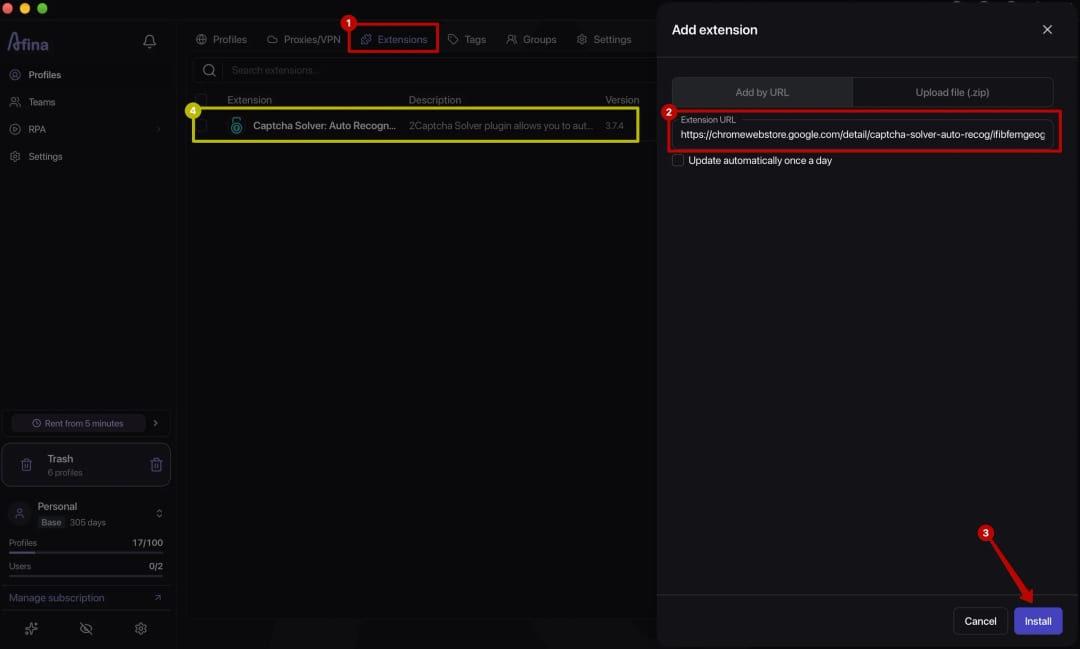
- open the required Afina profile
- enter the API key in the 2Captcha Solver settings
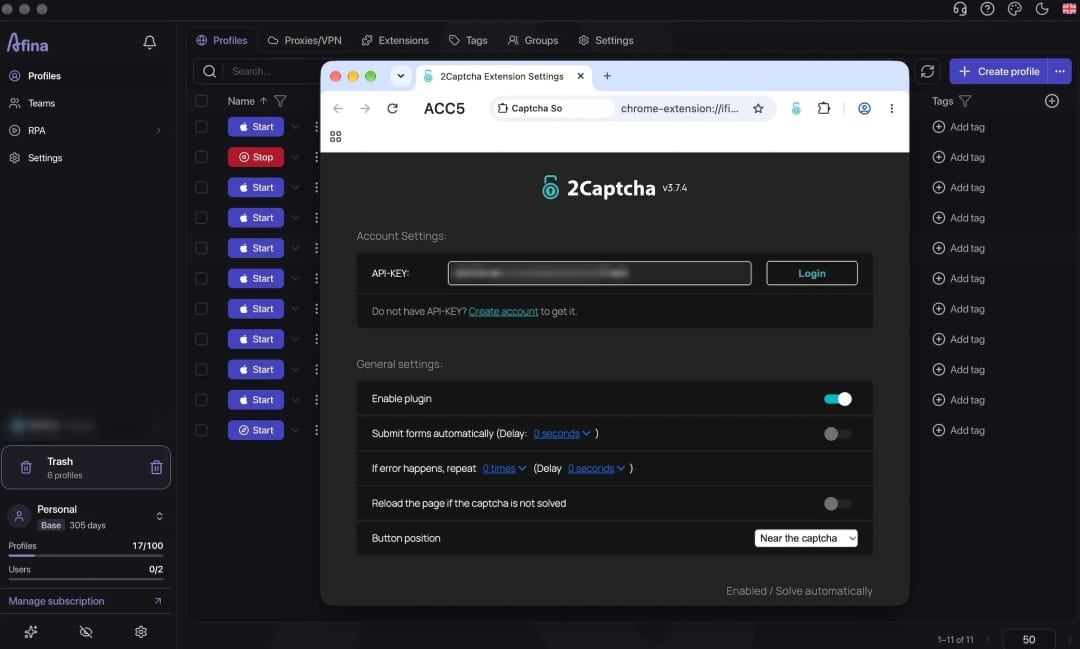
- enable only the required CAPTCHA types
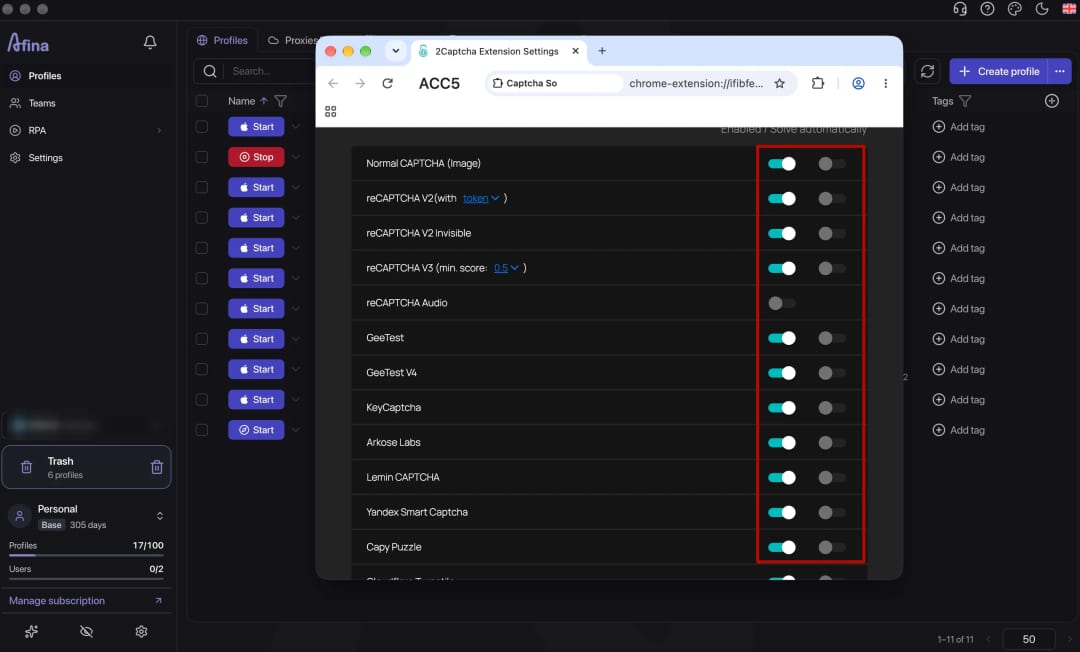
- test the setup on a test page
- configure the delay and retry behavior based on the result


Do not enable automatic submission for every form right away. If the form is submitted automatically after the CAPTCHA is solved, make sure all required fields have already been completed. Otherwise, the form may be sent before the workflow is finished. Test one typical workflow first, then apply the settings to other profiles.
An API workflow follows a different pattern: create a task, save the taskId, check its status at a reasonable interval, and process the response or error. The exact fields for reCAPTCHA v2 are listed in the 2Captcha API docs.
In Afina, the key can be stored centrally as an integration value instead of being duplicated in every workflow. A separate guide to connecting a CAPTCHA service in Afina demonstrates this approach with a global variable.
Why a Solved CAPTCHA May Not Let an Automated Workflow Continue
A CAPTCHA is only one layer of an antifraud system. A website may accept a valid token and reject the next action because the IP, User-Agent, cookie session, browser fingerprint, or behavior pattern does not match. That is why you need to test the full route to the target action, not just whether the API returns a ready status.
A check can fail if the token has expired, the task parameters (sitekey, action, or URL) do not match the page, or the CAPTCHA type has specific network session requirements. Sometimes the form is sent before other required fields are completed. Log the taskId, creation time, status, and the website's response after the token is submitted. The article on bot scoring and modern CAPTCHAs explains why solving a puzzle correctly does not make a session trusted.
In this process, Afina provides an isolated profile, a stable session, and workflow execution. The CAPTCHA service recognizes and solves a specific task. This material is provided for informational and educational purposes only.
Before scaling, test one profile, one CAPTCHA type, and one target action. If that route works consistently, increase parallelism gradually and monitor errors separately for each provider.
DownloadFAQ — Frequently Asked Questions
What Is the Best CAPTCHA-Solving Service for Automation?
2Captcha ranks first here because of its broad coverage, official extension, and API. You should still verify the choice against the CAPTCHA types in your own workflow.
Can I Install 2Captcha Solver in an Afina Profile?
Yes. You can install the official extension in an Afina browser profile and connect it with an API key. Start by enabling only the required CAPTCHA types and testing one typical route.
How Does a CAPTCHA Service Extension Differ From an API?
An extension works inside an open page, while an API gives a workflow programmatic control over the task queue and results. The extension is convenient for manual profile work, while the API is better for a repeatable workflow.
Why Does 2Captcha Return a Token While the Website Still Blocks Access?
The website may check the IP, User-Agent, cookies, fingerprint, and behavior after the CAPTCHA. The token may also have expired, been created for the wrong sitekey, or been obtained in a different IP session.
Do All Services Support the Same CAPTCHA Types?
No. Coverage differs between providers. NoneCap focuses on hCaptcha, while general-purpose services support several CAPTCHA families through APIs and extensions. Check the documentation for your specific task before integrating a service.