Multiple Ticketmaster Accounts: Rules and Safe Setup
Multiple Ticketmaster accounts are not only for people trying to buy more tickets. In normal work, this may be an agency handling client purchases, a corporate team, or several people responsible for different events. The risk appears when all those sessions live in one browser.
Ticketmaster is sensitive to repetition. The same phone number shows up, the card repeats, cookies move between profiles, IP jumps between countries. The system does not explain which exact signal fired. It simply limits the queue, cancels the order, or asks for another check.
Can you have multiple Ticketmaster accounts?
Multiple accounts can exist when each one belongs to a separate person or has a clear work role. Using them to bypass event limits, queue rules, or platform restrictions is risky. Those patterns get checked quickly.
Before launching anything, answer this honestly: who owns each account, and why does it behave this way? If ten profiles log in from the same browser fingerprint, rotate on one IP, and share similar payment traces, it no longer looks like team work.
| Scenario | Risk | Cleaner setup |
|---|---|---|
| Separate team member accounts | Low | Separate profiles, access, and login history |
| Client purchases for different people | Medium | Do not mix data, proxies, or cookies |
| Mass queue access | High | Do not use accounts to bypass event rules |
| Ticket resale workflows | High | Check event rules and avoid repeated signals |
For stable work, start by cleaning up the environments. Profile management separates one account from another, multi-accounting helps with roles and access, the proxy manager keeps the network layer under control, and antidetect anonymity keeps technical traces from mixing.
How Ticketmaster may connect accounts
Ticketmaster does not publish its full check logic, but the usual signals are clear: account data, payment, phone number, queue behavior, network, cookies, and digital browser fingerprint. One match rarely decides everything. The problem starts when there are many matches.
Common overlap points:
- the same phone number or similar email pattern;
- repeated payment details;
- several accounts opened inside one browser profile;
- shared cookies, cache, and local storage;
- one IP address for parallel actions;
- sharp location changes between logins.
Incognito mode is not enough. It removes some local history, but it does not create proper cookie isolation, control WebRTC leaks, or keep sessions stable over time. For recurring work, use separate profiles with their own proxy, timezone, and language settings.
How to organize accounts without session mixing
The most reliable model is simple: one account lives in one browser profile and does not carry someone else's cookies. If a profile logs in from Germany today, Canada tomorrow, and a different device the next day with the same fingerprint, the system sees strange behavior. That is not flexibility. It is noise.
In practice, it looks like this:
- Create a separate profile for each account
- Attach its own proxy, ideally a stable residential proxy
- Do not move cookies between accounts
- Avoid repeating phone, email, and payment data when accounts represent different people
- Do not launch every profile into the same queue at the same time
- Track which account belongs to which workflow
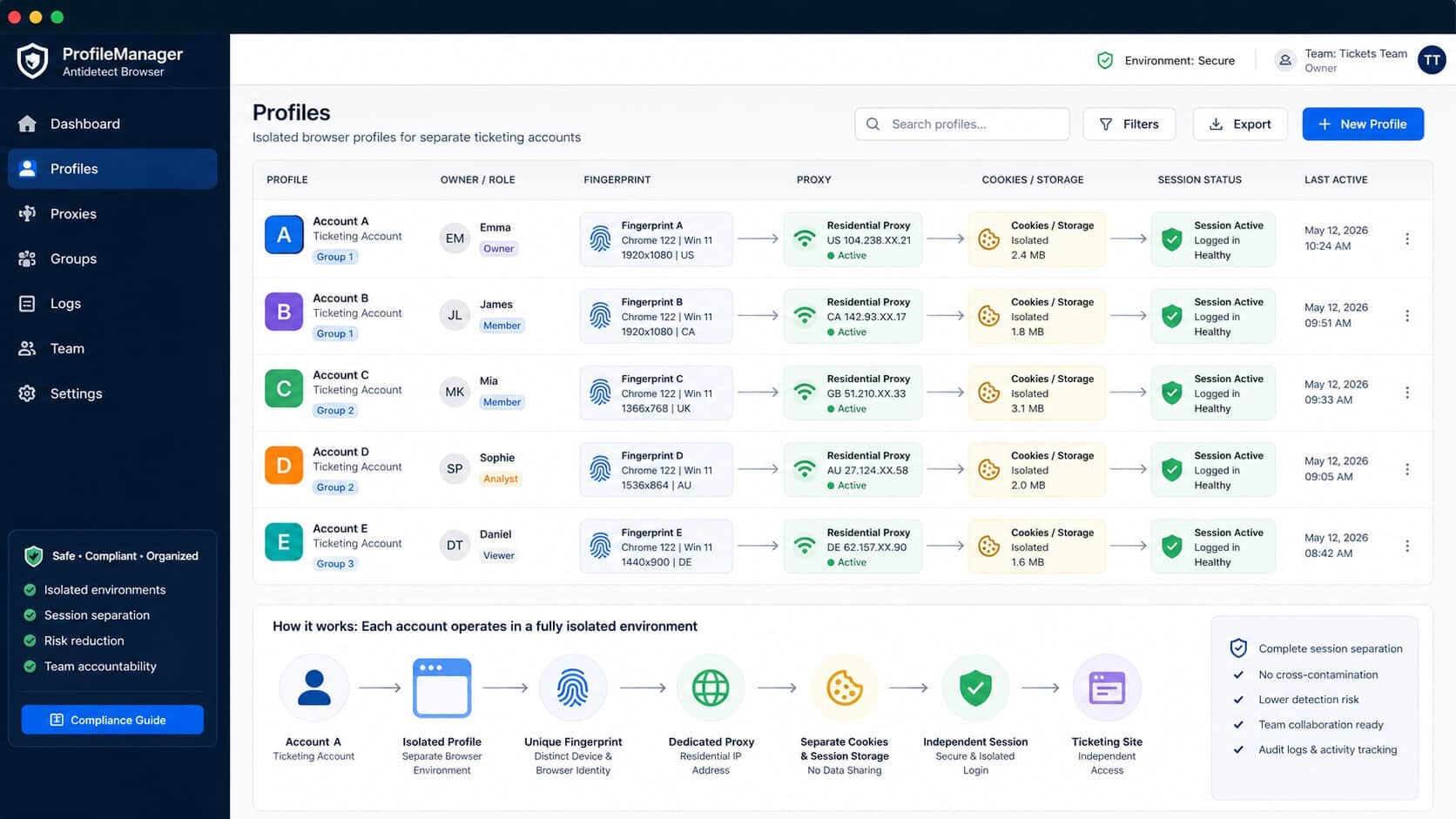
In Afina, you can keep this setup without a half-screen spreadsheet. Browser accounts separate sessions, groups and tags show owners, bulk proxy assignment saves time before launch, and cookie export helps with backup procedures. A profile does not become a shared drawer for every account.
Proxies, fingerprints, and ticket queues
A proxy is not magic. It is there to keep the environment stable. If an account consistently works from one region, with the same timezone and no IP jumps, it looks more natural. But a proxy without a separate profile solves very little.
Bad setup: ten accounts, one browser, one fingerprint, different proxies. The site still sees a repeated device configuration. A better setup combines proxy with fingerprint masking, session management, and a consistent User-Agent.
If a team works with ticketing regularly, it is better to set up isolated profiles and SOCKS5 proxies in Afina before the sale starts. Proxy checks and bulk operations remove manual rush, while scripts are better kept for service tasks: check status, open a profile, notify the owner. For the broader workflow, see the dedicated antidetect browser for ticketing page.
When automation makes sense
Automation makes sense when routine starts breaking the process: dozens of profiles, manual status checks, repeated page opens, team access control. But it should not imitate aggressive behavior or bypass event rules.
Useful automation tasks:
- check whether the proxy is alive before launch;
- open the right profiles on schedule;
- collect account statuses;
- prepare sessions without mixing cookies;
- notify the team about errors through the Telegram bot.
In Afina, these service tasks can be built with RPA workflows, action automation, task planning, and a local API. This does not rewrite platform rules. It keeps the team from getting lost in profiles, proxies, and repeated checks.
FAQ — Frequently Asked Questions
Can I create more than one Ticketmaster account?
Yes, but each account should be used within the rules of the platform and the event. If several profiles are created to bypass ticket limits or queue rules, the risk of checks and order cancellations rises sharply.
Why does Ticketmaster check or restrict accounts?
It may react to overlaps in user data, payment details, cookies, IP address, device fingerprint, and purchase behavior. The riskiest pattern is many accounts acting the same way from the same technical environment.
Is VPN enough for multiple accounts?
No. A VPN changes the network address, but it does not isolate cookies, cache, fingerprint, or behavior. Stable work requires separate browser profiles with separate session history.
How does Afina help with Ticketmaster accounts?
Afina gives each account a separate profile with its own cookies, fingerprint, and proxy. For a team, that means fewer accidental overlaps: one profile does not pick up someone else's session, and access does not live in chat.