Playwright vs Puppeteer vs Selenium in 2026 What to Choose for Browser Automation

Playwright, Puppeteer, and Selenium all control a browser from code. The right choice depends on the process, not on which name is louder. For modern web scraping, Playwright often wins. For Chrome-only Node.js work, Puppeteer is still clean and fast. Selenium remains useful when a team already has legacy QA infrastructure, many languages, or old browser requirements.
Short version: for a new project, I would usually start with Playwright. Not always. But often. It is fast, has auto-waiting, a strong test runner, Trace Viewer, and support for Chromium, Firefox, and WebKit. Puppeteer is the better fit when you need direct Chrome DevTools control. Selenium makes sense when Grid, Java, C#, Ruby, or enterprise test suites are already part of the stack.
How Playwright, Puppeteer, and Selenium Differ
The main difference is how each framework talks to the browser and how much modern tooling it gives you out of the box. Selenium uses WebDriver. Puppeteer controls Chromium through DevTools Protocol. Playwright uses its own automation layer and ships more tools for testing, traces, and parallel runs.
Selenium is the oldest. That is both a strength and a cost. It has a huge ecosystem, many language bindings, Selenium Grid, and years of production patterns. But the code can be heavier, waits need more care, and speed is usually lower.
Puppeteer is simpler. It fits Node.js well, launches Chromium quickly, and gives access to network events, PDF generation, screenshots, and performance metrics. If your product lives in JavaScript and the target browser is Chromium, it is a strong option.
Playwright is the most balanced choice. It supports several languages, several browser engines, isolated contexts, auto-waiting, and useful debugging. In a real team, that often matters more than a few milliseconds.
Languages, Browsers, and Speed Compared
Readers usually need a direct answer: which tool should I use for this job? This table keeps it practical.
| Criterion | Playwright | Puppeteer | Selenium |
|---|---|---|---|
| Best fit | modern tests, scraping, parallel jobs | Chrome automation, Node.js, DevTools | legacy QA, enterprise, many languages |
| Browsers | Chromium, Firefox, WebKit | mostly Chromium | Chrome, Firefox, Safari, Edge, IE mode |
| Languages | JS/TS, Python, Java, .NET | JS/TS officially | Java, Python, C#, JS, Ruby, others |
| Speed | high | high, especially short Chrome runs | lower due to WebDriver |
| Parallel runs | strong out of the box | custom code or libraries | Grid or infrastructure |
| Learning curve | low to medium | medium | medium to high |
Puppeteer can start faster in short Chrome jobs. On longer runs, the difference with Playwright usually fades. Selenium loses on raw speed, but it can still win when the existing system is built around it and a rewrite would cost more than the saved resources.
When Playwright Is the Better Choice
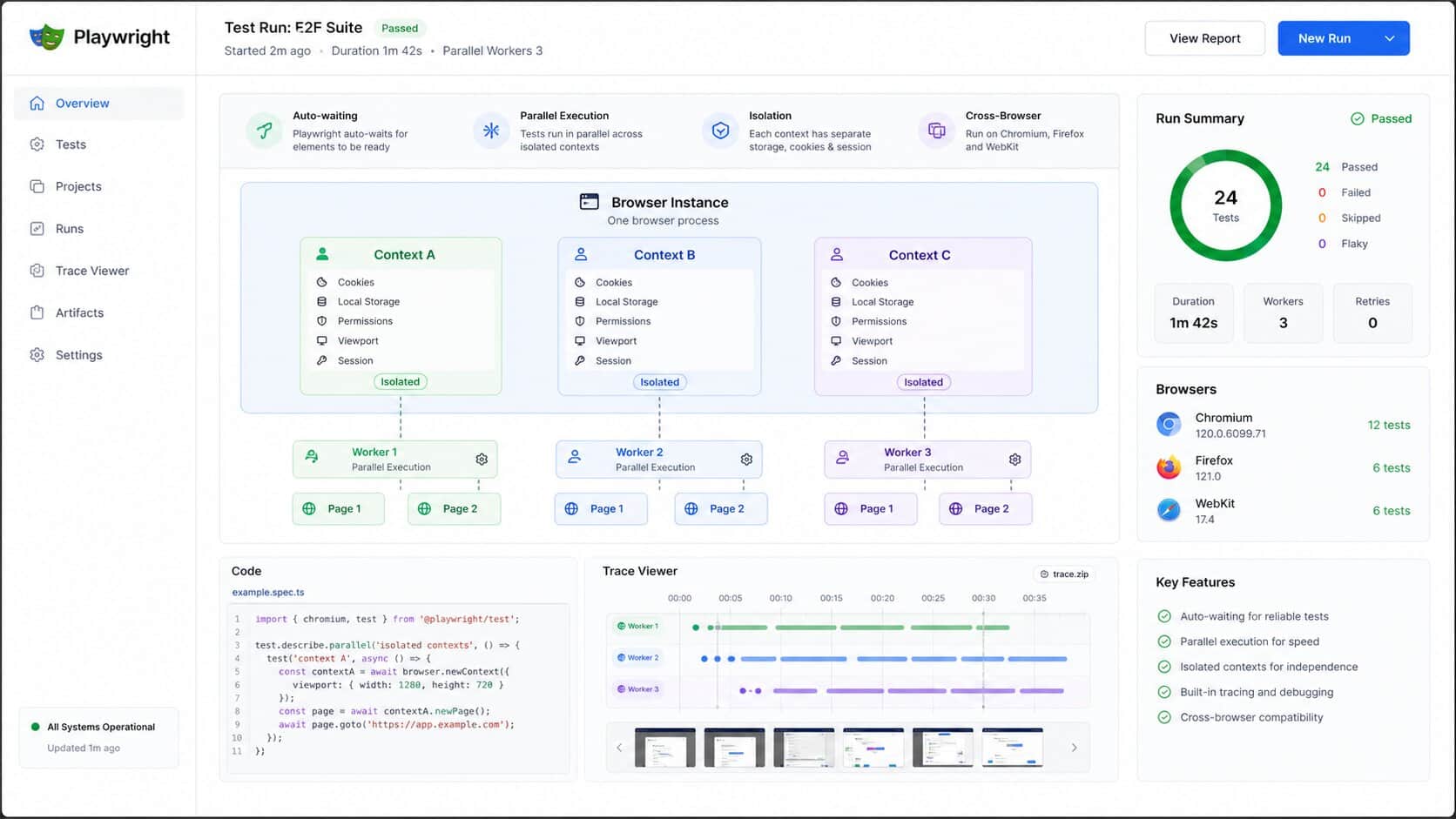
Choose Playwright for new projects that need speed, clean code, parallel sessions, and support for multiple browser engines. It is especially useful for testing complex SPAs, collecting data from dynamic pages, and running workflows where stable waits matter.
Auto-waiting removes a lot of daily pain. A button is not ready yet, the DOM is changing, a request is still in flight. In Selenium, those spots often turn into manual waits. Playwright handles them better.
Browser contexts are another advantage. You can run isolated sessions inside one browser process instead of launching a heavy browser instance for every task. For browser automation and scraping at scale, that difference is real.
Where Puppeteer Still Makes Sense
Puppeteer is strong when everything is tied to Chromium and Node.js. It is simple, fast, and close to Chrome DevTools. It works well for screenshots, PDF generation, performance checks, request interception, and compact automation services.
Its weakness is the same as its strength: Chromium focus. If you need WebKit or Firefox tomorrow, the path gets narrower. If your team does not write JavaScript, the official route narrows again.
For a narrow job, that is fine. For a platform that needs to grow for several years, it becomes a real decision.
Where Selenium Still Has a Place
Selenium is not dead. It is slower and less pleasant for new work, but still useful in large companies with existing test infrastructure, Selenium Grid, Java or C# teams, old browser requirements, and thousands of working tests.
Rewriting a mature test suite just because another tool feels newer is not always smart. If Selenium keeps the QA process stable, keep it. The problem starts when teams try to build a high-volume parser with dozens of parallel browsers on one server.
That is where Selenium gets heavy. More CPU, more RAM, more infrastructure. And more places where something can fail at 3 a.m.
Anti-Detect, Headless Mode, and Automation Risks
By default, all three frameworks leave technical automation traces. A site may inspect navigator.webdriver, headless behavior, fonts, Canvas, WebGL, language, timezone, network signals, and the wider browser fingerprint.
Stealth plugins help, but they do not make automation invisible. They patch some obvious signals, while anti-bot systems look at more than one property. This matters on commercial platforms, ad accounts, and sites where web scraping fingerprinting is already a known problem.
When automation touches accounts, proxies, and team workflows, environments should be separated. In Afina, each process can live in a separate browser profile with its own cookies, cache, fingerprint, and proxy. For repeated workflows, scripts and automation help keep routine work out of fragile custom launchers.
DownloadFAQ — Frequently Asked Questions
Is Playwright better than Puppeteer?
For most new projects, Playwright is the safer starting point because it supports several browsers, auto-waiting, and better diagnostics. Puppeteer is stronger for narrow Chrome-only automation in Node.js.
Is Selenium outdated?
No. Selenium is still useful in legacy QA, enterprise infrastructure, and teams with large existing test suites. For new scraping or modern web testing, Playwright is often more practical.
Which framework is fastest?
Puppeteer and Playwright are usually faster than Selenium. Puppeteer can be slightly faster in short Chromium jobs, while Playwright often gives a better balance of speed and stability in longer workflows.
Can these tools be used for web scraping?
Yes. All three can run a real browser and handle dynamic pages. For large-scale scraping, teams usually prefer Playwright or Puppeteer because they are lighter and faster.
Are stealth plugins enough for anti-detect work?
No. Stealth plugins remove some obvious signals, but they do not replace profile isolation, good proxies, fingerprint control, and clean operational discipline.