Professional vs Personal X Account: What Teams Should Choose in 2026

An X Professional Account is a free mode for businesses and creators that adds a professional category, professional profile tools, and available analytics features. It is used to present a brand or specialist more clearly, configure a work profile, and promote individual posts. In practice, teams must consider country-level feature availability, X requirements, and the fact that changing the account type does not increase organic reach by itself.
A Personal account retains standard capabilities: posts, replies, private messages, and audience interaction. This is often enough for one user. When a team manages a brand, clients, or several profiles through the X web version, the account type should be evaluated together with roles, session stability, and access control.
Choose Personal for private communication, Creator for the professional presence of an individual, and Business for a company or organization. X Premium is a separate paid subscription and does not replace any of these types.
What is an X Professional Account and who can use it
An X Professional Account is a mode for an existing profile, not a separate product or new registration. Switching is free, and the profile can return to the Personal type through professional profile settings. After switching, the user selects one of two types, Creator or Business, and a category describing their activity.
Under the published X criteria, a professional profile must include a name, bio, and profile picture, clearly represent an authentic professional identity, and have no history of repeated policy violations. Parody and fan profiles do not meet the Professional criteria. An agency managing multiple X accounts should review every client separately because one profile's status says nothing about another.
For teams and social media multi-accounting specialists, Professional makes it possible to select a professional category and use Professional Home, available Profile Spotlights, and Quick Promote. However, the toolset depends on the country, profile type, and additional conditions. Shop Spotlight, for example, should not be planned as a universal feature for every market.
Professional Home
Professional Home is designed as a work dashboard with analytics and available professional resources. Its metrics, periods, and even the dashboard itself may differ by account and current tool version. Before switching, open the menu for the specific profile and inspect the available set. Building reporting around a feature the team has not yet seen is risky.
Profile Spotlights
Profile Spotlights can add business elements to a profile, such as contact information, an address, or a link. Specific Spotlight types depend on feature availability for the account and region. Some of this information becomes public. Agree on a work number, email, and physical address with the account owner before publishing them, especially when a contractor manages the page.
Quick Promote
Quick Promote can start promotion for an individual post when the feature is available to the profile. However, a promotion button does not mean the campaign will be approved: the advertising account, post, and landing page must meet current X Ads requirements. Check advertising eligibility separately from Professional settings.
An agency should separate two decisions. First, determine who the profile represents to the audience: a person, a brand, or a regular community participant. Then decide separately how the team will preserve the session, grant access, and identify the responsible person. Professional helps define the profile's public role, while team access requires its own arrangements.
How does an X Professional Account differ from Personal
The main difference is professional presentation and additional work tools. The basic X mechanics do not change: every type can publish posts, reply, and communicate. Professional adds context about the owner's activity but does not create an automatic advantage in recommendations.
| Criterion | Personal | Creator Professional | Business Professional |
|---|---|---|---|
| primary identity | private individual or regular user | creator, consultant, or public specialist | company, store, agency, or organization |
| account type cost | free | free switch | free switch |
| professional category | unavailable | available | available |
| Professional Home | unavailable | depends on availability | depends on availability |
| Profile Spotlights | unavailable | when eligibility conditions are met | when eligibility conditions are met |
| Quick Promote | no dedicated access through a professional profile | subject to advertising requirements | subject to advertising requirements |
| X Premium | separate subscription | separate subscription | separate subscription |
| automatic reach increase | not stated | not stated | not stated |
Professional covers professional profile presentation, Premium covers paid subscription features, and X Ads covers advertising campaigns with separate eligibility rules.
An advertiser must separately meet current X Ads requirements. Posts from an advertising profile must be public, the account cannot be deactivated or suspended, and profile details and URLs must comply with advertising rules.
Advertising eligibility conditions, including requirements for organization verification or a paid subscription, should be checked in the current X Ads rules for the relevant advertiser category. Switching to Business does not replace this check.
Analytics should also remain separate. Professional Home data describes profile performance, Ads Manager shows paid campaign results, and Premium has its own feature set. If a team merges these metrics without distinction, it may incorrectly attribute advertising-driven growth to the account type change.

The switch should not be treated as a way to improve post visibility on X. If impressions increase after the change, the team should examine content, publishing frequency, audience activity, and paid promotion before attributing the result to the account type.
When should a team choose Creator or Business
Creator suits a profile centered on a specific person, while Business suits a page representing a company. Team size is secondary. Ten editors may manage a founder's Creator account, while one person may administer a small store's Business profile.
Focus on whom the audience sees. If followers expect personal views from a consultant, journalist, designer, or creator, Creator is the consistent choice. If the page publishes product updates, responds to customers, and represents a legal entity, Business is more logical.
This practical table helps match the type to the profile's purpose:
| Scenario | Recommended type | Reason |
|---|---|---|
| personal posts and conversations without professional positioning | Personal | additional professional elements are unnecessary |
| a specialist runs a profile under their own name | Creator | the audience follows the person and their expertise |
| a founder develops a personal brand separately from the company | Creator | the profile voice belongs to the founder |
| official agency or SaaS product profile | Business | the account represents an organization |
| a store publishes products and answers customers | Business | commercial identity matters more than the individual author |
| the team only wants more organic impressions | do not switch for this purpose | X does not state that the type provides an automatic reach bonus |
The same client may have two different profiles. A studio page may operate as Business while its founder's profile uses Creator. They need separate editorial plans and responsible people even when one team prepares the posts.
Before choosing, perform a short review and record the results for each profile. It takes a few minutes and prevents the next manager from having to guess the previous manager's reasoning.
- determine whether the account speaks for a person or an organization
- record the action a visitor should take after viewing the profile
- list the professional features the team genuinely plans to use
- verify that the name, bio, and avatar match the selected identity
- assign a decision owner and a review date
If the professional tools are not yet needed, the switch can be postponed.
In ambiguous cases, evaluate the manager's weekly tasks and revisit the decision when a specific need appears.

The category should reflect current activity rather than future plans and match the name, bio, and subject of the posts. An inaccurate category may mislead visitors and does not guarantee an advantage in recommendations.
How to switch to an X Professional Account and choose a category
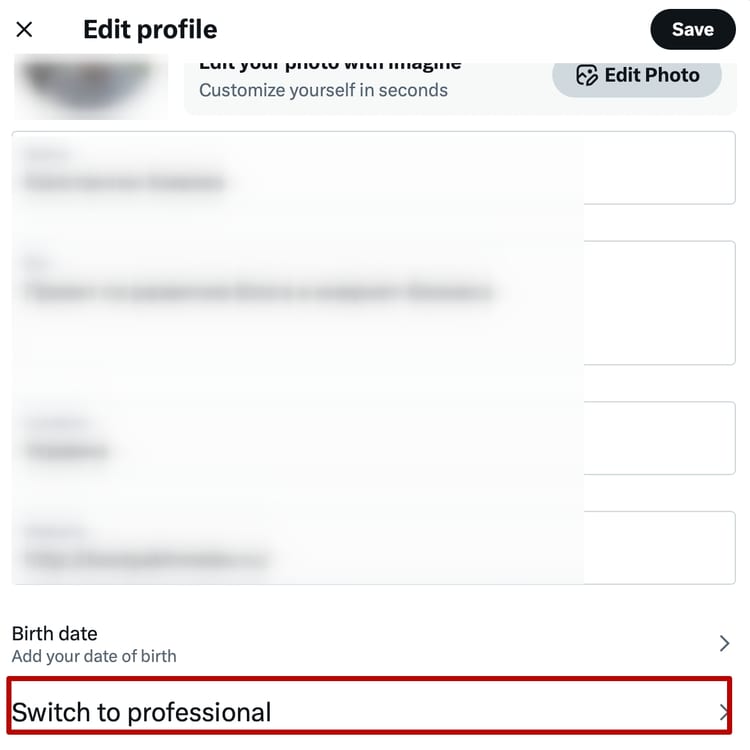
The switch is made from the existing profile through X for Professionals or the Switch to Professional command. Before changing it, check that the profile is complete and agree on the account type with its owner. For a client page, this changes public positioning and is not a minor technical setting.
Use the following sequence:
-
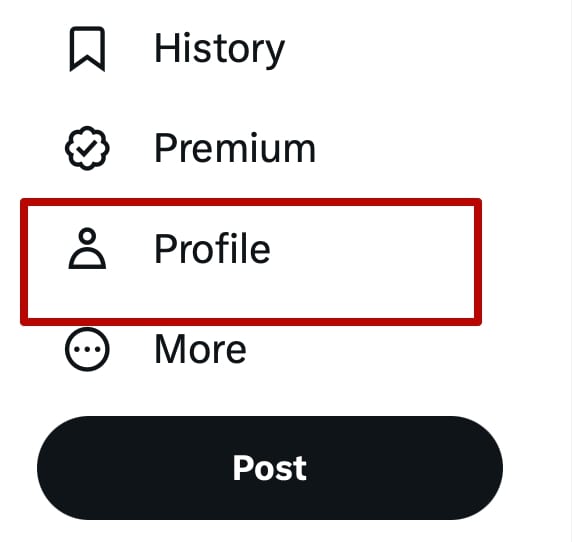
open the required X profile
-
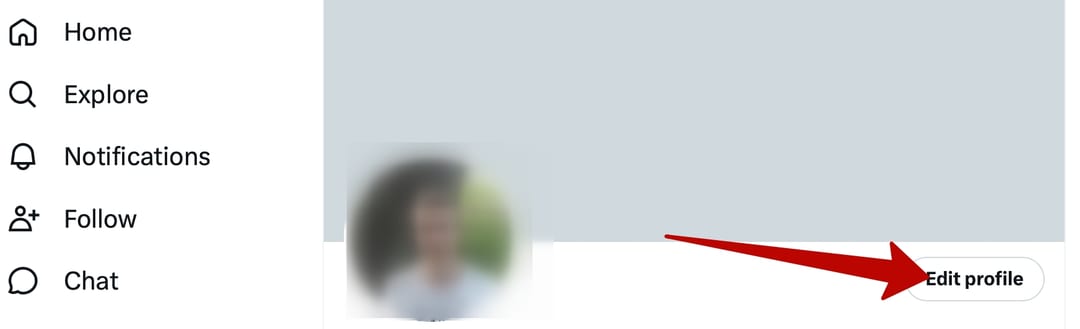
go to the side menu or profile settings
-
select X for Professionals or Switch to Professional
-
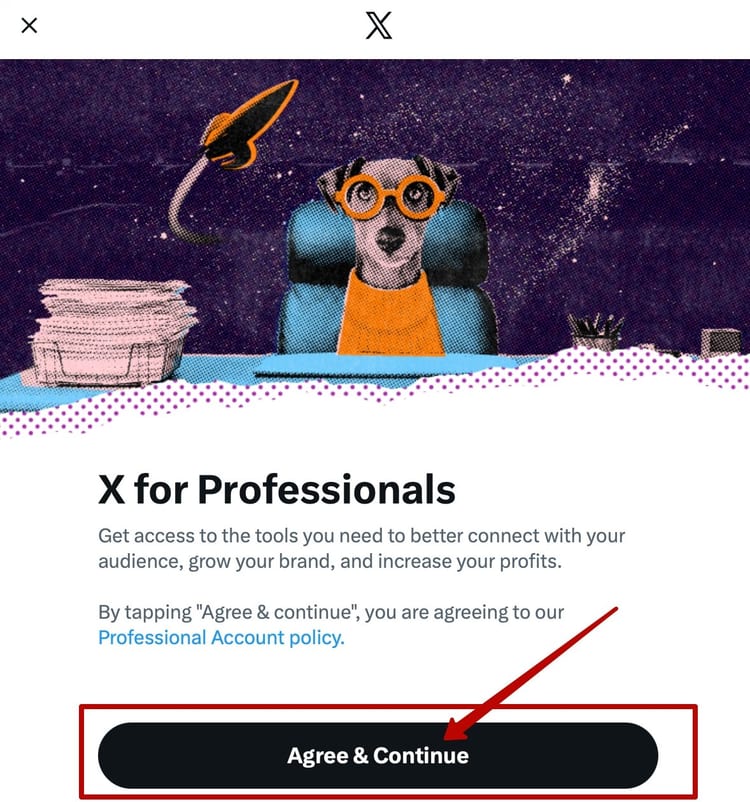
select Agree & Continue
-
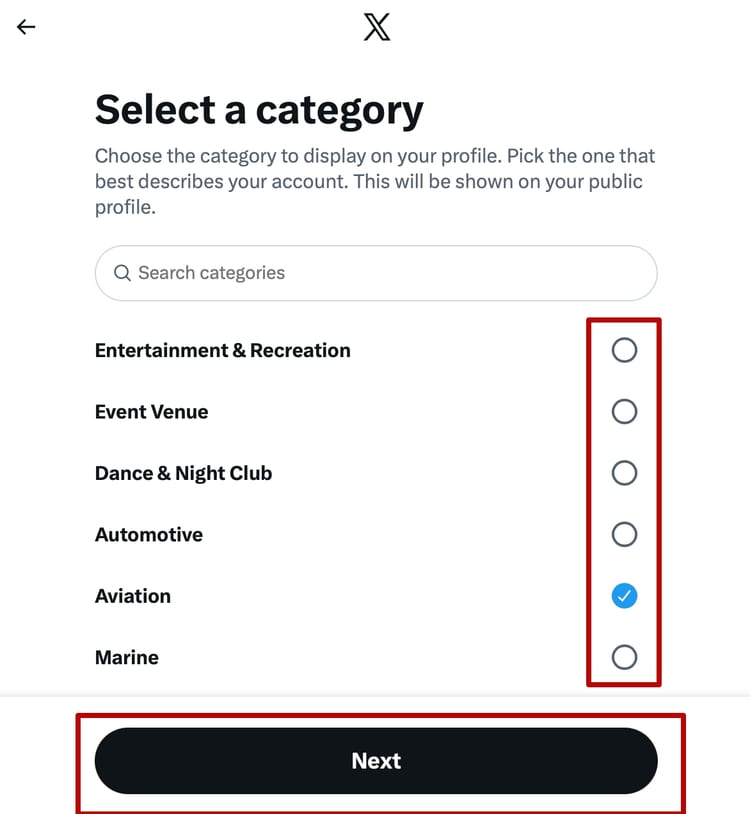
find the category that most accurately describes the profile's current activity
-
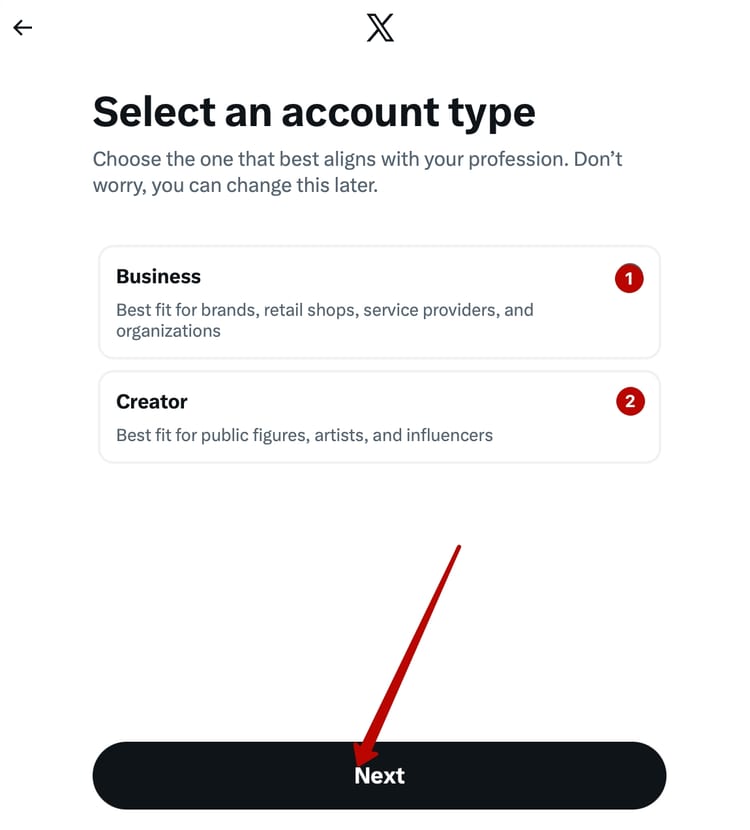
select Business or Creator according to the public identity
-
finish the switch and review the tools available to this particular account


Do not copy categories from third-party lists. Available options can change, so use the current category list in X. Look for a specific definition of the profession or business, then check whether the category appears appropriately after switching.
Compare three elements when selecting a category: actual activity, audience expectations, and content from the previous month. A "store" category is clear for a profile with products and customer support. The same label would look strange on a founder's account dominated by personal observations about the market.
Take a screenshot of the selected category and add it to the internal client card. Record the reason, change date, and participant who approved it. This log is particularly useful for agencies where a profile passes between managers and an earlier decision can disappear in correspondence.
You can also return to Personal through profile settings. Menu item names may change:
-
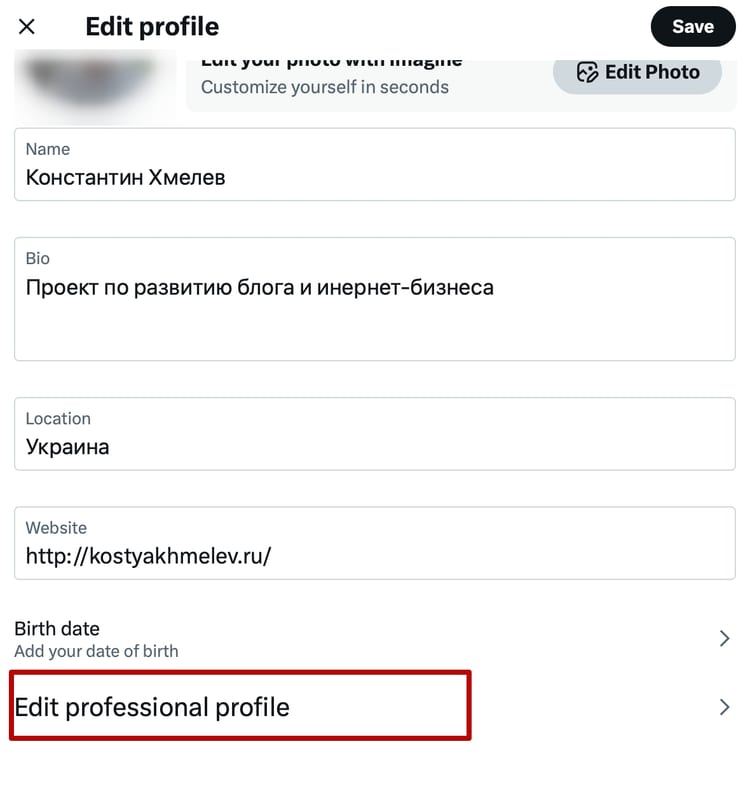
open Edit Profile
-
go to Edit Professional Profile
-
select Switch Account Type and the required type
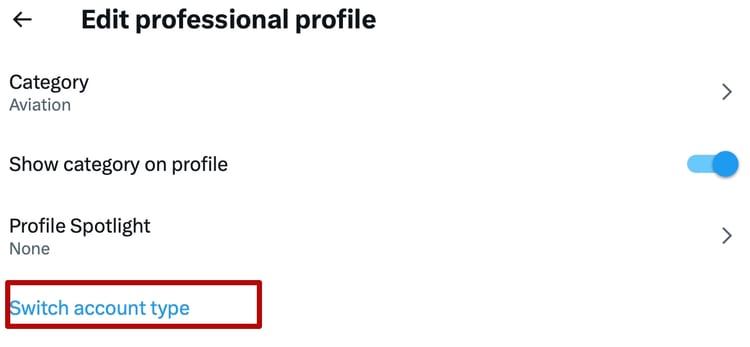


Before returning to Personal, record which Spotlights or professional tools the team uses because they may become unavailable after the change.
How to review the profile before switching
Before conversion, view the profile as though you were seeing it for the first time. The name, avatar, cover, bio, and URL should describe the same person or organization. If the name belongs to a store but the bio is written from the perspective of a random manager, the Business label will not resolve the contradiction.
Use this short checklist:
- the name and avatar unambiguously represent the owner
- the bio explains the activity without exaggerated promises
- the profile link works and leads to a relevant page
- the contact details can be displayed publicly
- recent posts match the selected professional category
- the owner approved Creator or Business and any future Spotlights
After switching, perform a control review in the mobile app and browser. Some elements display differently, and long wording may be truncated. Then record the final appearance in the client card. This small step prevents a team from overlooking an old address or unsuitable category for weeks.
How should a team organize access to multiple X accounts
After selecting the account type, the team must separately organize roles, credentials, and browser sessions. It needs an operational structure: profile owner, responsible editor, delegation method, login environment, and metrics source. Without this system, professional status will not organize team operations.
For access without sharing a password, X describes the Delegate mechanism with admin and contributor roles. Before configuring it, check the X help center and account menu to confirm whether the feature is available, which conditions apply, and what permissions each role includes.
Do not assume delegation provides access to the password, recovery settings, or every advertising tool. If the mechanism is available and fits the team's tasks, use it instead of sharing credentials.
If the team manages several client profiles, create a record card for each one. Six fields are enough:
- account owner
- public role of the profile
- Personal, Creator, or Business type
- responsible team members
- separate login environment
- source of organic and advertising analytics
This registry should not contain passwords in plain text. Use a password manager for secrets and grant the minimum required role through standard delegation. The manual multi-accounting control guide covers how to divide responsibility and profiles.
Consider an agency with three clients: a consultant, an online store, and a product company. The first profile uses Creator, while the other two use Business. A content manager can publish and reply, an analyst works with reports, and the owner or administrator controls delegates and recovery information. Access rights for every profile should match each participant's tasks.
If an employee urgently loses permission to work with an account, immediately revoke their delegated role, workspace access, and password manager access, then review active sessions. During a planned transfer, first confirm that the new manager has the required rights and only then revoke the previous manager's access. Do not leave an active session on the device of someone who no longer handles the client.

Do not run the same browser profile on two devices simultaneously without coordination. Parallel work with one profile can cause cookie and localStorage synchronization conflicts, session-state loss, or another login requirement. The working rule is simple: only one team member should use a shared browser profile at a time.
How to transfer an account between managers
A transfer begins with context. The password or delegated access comes only after the new manager understands the workflow. They should know the account type, approved category, owner, communication tone, active campaigns, and access restrictions. Without this context, even a correct login can lead to a publishing or reporting error.
Use a consistent sequence:
- assign the new responsible person in the account card
- grant the required role through X Delegate when available
- provide access to the relevant browser profile and work materials
- transfer the access recovery procedure without exposing unnecessary secrets
- conduct a shared work session and review drafts, analytics, and scheduled campaigns
- after confirming the transfer, revoke the previous manager's access and check their active sessions
Do not use two independent primary data sources at the same time. If the team maintains a calendar in its work system, a manager's personal spreadsheet should not contain another version of the plan. The same applies to metrics: organic reports and Ads Manager can be combined in one dashboard, but sources and periods must be labeled.
Which risks and limitations should teams consider before switching
Professional status does not exempt an account from X rules. The platform evaluates identity authenticity, profile quality, and behavior. Repeated violations can result in losing professional features, advertising access, or the account itself.
The team should consider these limitations:
- Professional Home and Spotlights may not be available to every account or region
- Professional does not include X Premium or replace advertising verification
- Creator or Business does not provide a documented organic reach bonus
- public contact details in a professional profile require review before publication
- changing the category does not fix weak positioning or inconsistent content
- simultaneous logins and abrupt network changes may trigger additional checks
Managing many profiles introduces a separate risk. X rules allow multiple accounts for different, non-duplicative purposes. Check current platform policy for specific numerical restrictions. X prohibits artificial post amplification, bulk content duplication, and sanction evasion. A social media manager may act for a third party when the activity complies with platform rules.
Profile origin matters as well. Account transfers or sales may violate X rules depending on the circumstances, so buying X accounts should not be treated as a standard alternative to creating and delegating a legitimate profile. A brand is better served by defining the owner, recovery details, and roles from day one.
To evaluate the effect of switching, record baseline metrics for the 28 days before the change: impressions, engagement, link clicks, and advertising results separately. After switching, compare equal periods and note other changes, such as a new content plan or Quick Promote budget. This comparison helps track the trend but does not prove that Professional caused it.

For a more accurate comparison, do not change the profile type, publishing frequency, and content format simultaneously. Maintain the editorial rhythm for at least one comparable period. Adjacent months are not enough for a seasonal business. Compare the equivalent period of the previous campaign as well.
Add a short note to the report explaining the reason for switching. For example: "Business was enabled for the brand category and Professional Home; reach was not the goal." This note helps prevent false conclusions about the account type's effect on performance.
How does Afina separate X working environments
A standard browser is often enough for one personal profile. When an agency manages accounts for different clients, it must avoid mixing cookies, accidentally opening the wrong profile, and losing control of network settings.
Afina gives every account a separate Chromium profile with its own cookies, localStorage, digital fingerprint parameters, and proxy. A team can distribute profiles between workspaces and configure participant permissions. This does not change X rules or guarantee that checks will not occur, but it helps reduce accidental session mixing.
During a weekly review, check the responsible person, active session, network route, and date when recovery information was last updated in every client profile card.
The workflow can be assembled as follows:
- create a separate Afina profile for each legitimate X account
- assign a stable proxy only when a separate network is genuinely required
- configure the time zone and language for the real work environment without creating an artificial identity
- add the client name, account type, and responsible person to tags or groups
- share the profile with the required team using minimum permissions
- run one shared profile sequentially to avoid session conflicts
If the team works with advertising, keep the professional category and profile type next to X advertising data without mixing organic and paid metrics. This material is provided solely for informational and educational purposes.
After selecting an account type, the main task is coordinating several people without confusion. Isolated profiles and controlled permissions give the team a consistent and predictable workflow here.
DownloadFAQ — Frequently Asked Questions
What is an X Professional Account?
An X Professional Account is a free mode for eligible businesses and creators. It adds a professional category and available work tools.
How does an X Professional Account differ from Personal?
Professional adds professional presentation and access to Professional Home and Spotlights when eligibility conditions are met. Personal retains standard functions without these professional elements.
Should you choose Creator or Business on X?
Creator suits the profile of an individual specialist, while Business suits a company or organization page. The choice depends on the account's public identity.
Is Professional required for advertising on X?
No. Professional alone is not a mandatory pass to X Ads. The advertising account must separately meet verification and quality requirements.
Can an X Professional Account return to Personal?
Yes. You can change the type through Edit Professional Profile and Switch Account Type. Check dependent professional features before returning.
Can a team manage several X Professional Accounts?
Yes. A team can manage legitimate profiles with different purposes and owners. Clear roles, separate sessions, and compliance with X authenticity policy are required.