Afina HTTP API#
Afina HTTP API is a bridge between the Afina antidetect browser and your own code. Everything you usually do manually in the interface - create profiles, start browsers, run RPA scripts, switch proxies - can be done with regular HTTP requests. This is most useful when you need to connect Afina to a CRM, an AI agent, or a CI pipeline and stop returning to manual work.
- Base URL:
http://127.0.0.1:50778(default port50778; if it is busy, the server takes the next free one). - Format: all responses are
application/json, except/api/tasks/logsand/api/scripts/run-logs(text/plain). - Coverage: all ~67 HTTP endpoints are documented and grouped into 11 logical modules.
Any Programming Language#
The API is just regular HTTP requests, so you can call it from any programming language. You do not need special Afina SDKs or libraries: open your favorite IDE and write a short script in Python, JavaScript, Go, PHP, or anything else that can make HTTP calls. Below is the shortest possible Python example using the requests library to get a list of profiles:
import requests

r = requests.get("http://127.0.0.1:50778/api/profiles/list",
                 headers={"x-api-key": "YOUR_KEY"})
print(r.json())
That is enough to make sure the server is alive and responding. After that, you only change the endpoint URL and method (GET/POST/DELETE); the rest of this reference describes which requests are available.
How the API Works#
Inside Afina, two parts work side by side. One is the familiar desktop application with buttons you click with the mouse. The other is a small local web server that starts quietly with the application and listens on port 50778 on your own machine (127.0.0.1). That is where the HTTP API sends its requests.
A few things to keep in mind:
- The API runs locally. The server is bound to
127.0.0.1, so it accepts requests only from your computer. No cloud is involved: it is not exposed externally, and while the Afina application is closed, the API is simply unavailable. If you need access from another machine on the local network, that is configured separately, but by default everything stays on localhost for security. - The application is the "brain"; the API is the "hands". When you send
POST /api/profiles/start, the server does not act by itself: it asks the Afina desktop engine to launch a real browser with the required fingerprint and proxy, then returnswsEndpoint, a direct address for connection through CDP (Chrome DevTools Protocol). In practice, the API is a thin control layer over the same engine that powers the GUI. - One shared state. The API and the interface look at the same database (SQLite). Create a profile through the API and it immediately appears in the application list, and the reverse is also true. After every write that changes data, the server sends a
reload-eventso the GUI picks up the changes immediately. - Predictable responses. Almost everything returns JSON with a clear structure (
status,data,message,error). Logs are the special case: they are returned as plain text so they can be streamed directly to the console.
How to Use the API#
All API work follows three steps: get a key -> send a request with it -> read the JSON response. Let us go through each one.
1. Key-based authorization. Because the server has access to your profiles, proxies, and cookies, every request to /api/* must include the x-api-key header. You get the key once in the application: Settings -> Afina Core Settings -> API key. Treat it like a password: do not hard-code it in public repositories; keep it in environment variables or a secret manager. If the key is invalid or missing, the server returns 401 and closes the connection. Exceptions that do not require a key: GET /api/health, GET /, and GET /oauth/callback.
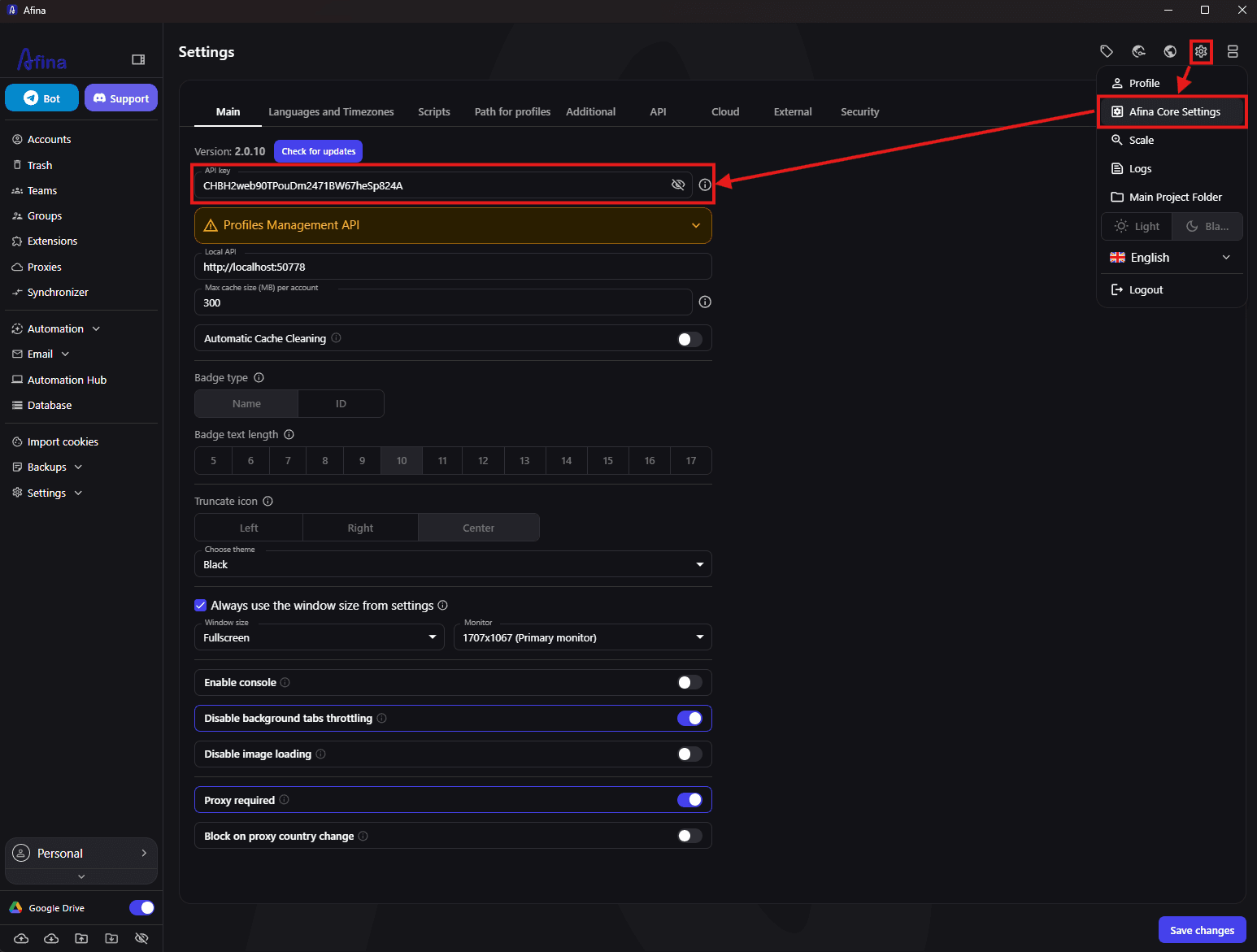
2. Common use cases. The API is built to embed Afina into your own processes. It is most often used to:
- Integrate Afina with CRM or internal systems - for example, automatically create a new browser profile for each client or account.
- Build AI agents that open pages by themselves, read them (
/api/profiles/eval), take screenshots, and make decisions. - Create profiles in bulk with unique, realistic fingerprints - dozens or hundreds of them without clicking a mouse.
- Run RPA scripts on a schedule across account groups (mints, warmups, routine actions) and monitor their execution through logs.
- Manage proxies and cookies programmatically - check them, add them, and export/import sessions between profiles.
3. First request. The fastest way to confirm that everything is alive is to ask the server for the list of profiles:
curl -H "x-api-key: YOUR_KEY" http://127.0.0.1:50778/api/profiles/listIf you get JSON with a list of accounts, you are connected. After that the logic is almost always the same: first find the required id values (through */list), then perform an action (create, start, run, and so on), and for long operations such as tasks or scripts, watch their logs. Below is the full reference split into 11 thematic modules.
Authentication#
All /api/* endpoints require the x-api-key header (Settings -> Main -> API key). With no key or an invalid key, the response is 401 Unauthorized.
curl -H "x-api-key: YOUR_KEY" http://127.0.0.1:50778/api/profiles/listWithout a key, only GET /api/health, GET /, and GET /oauth/callback are available. CORS is limited to localhost origins (http://localhost, http://127.0.0.1, tauri://); methods are GET, POST, DELETE, OPTIONS; headers are Content-Type, X-API-Key.
Conventions#
A few cross-cutting rules work the same way in all modules. Read them once and the rest of the reference becomes easier:
id= numeric PK (SQLite);accountId= profile UUID. Most write endpoints accept both, so use whichever is more convenient in your code.- Boolean values are accepted as
true/falseor0/1; datetime uses ISO-8601 format (defaultdatetime('now')). */delete= soft delete (isDeleted=1, object goes to Trash and can be restored);*/hard-delete= physical deletion from DB/disk with no recovery;*/update= PATCH only the submitted fields (everything else stays as it was).- Required markers in tables: ✅ - required, ⬜ - optional.
Health#
GET /api/health is the simplest server "ping" and does not require an API key. It is convenient in scripts as a check for whether the application is alive before a series of requests. Response: { "status": "ok", "running": 2 }, where running is the number of browsers currently running.
Module 1. Profiles / Accounts#
Profiles (accounts) are the foundation of all work in Afina. Each profile is a separate isolated browser with its own unique fingerprint, cookies, proxy, and settings. Because of this, each site sees the profile as a separate real user on another device.
This is your main scaling tool. Here you programmatically assemble dozens of unique fingerprints, update and delete them, and manage the browser lifecycle itself: start, stop, and create one-time disposable profiles for single-use tasks. If you are just getting started with the API, start here.
GET /api/profiles/list - list of accounts; each item includes isRunning, tags, and groups. Query filters (AND, optional):
| Parameter | Type | Req. | Description |
|---|---|---|---|
isRunning | bool | ⬜ | Running/stopped |
groupId | int | ⬜ | Filter by group |
tagId | int | ⬜ | Filter by tag |
{ "message": "...", "count": 2, "accounts": [
  { "id": 50, "accountId": "<uuid>", "name": "acc-1", "os": "Windows11",
    "proxyId": 7, "isRunning": true, "tags": [], "groups": [] } ] }
GET|POST /api/profiles/get - one account. Query/body { accountId }. -> { message, profile:{...} }.
POST /api/profiles/create - creates a profile. Fingerprint: not provided -> generated; full -> normalized; partial -> base + merge (incoming-wins).
| Field | Type | Req. | Description |
|---|---|---|---|
name | string | ⬜ | Name |
accountId | string | ⬜ | Force UUID |
os | macos/windows10/windows11 | ⬜ | FP generation (default macos) |
osArch | arm64/x86 | ⬜ | macOS architecture (default arm64) |
chip | m1-m4/intel | ⬜ | Mac chip |
browserType | string | ⬜ | afina(default)/mimic/octo/vision/ads/dolphin |
proxyId | int | ⬜ | Saved proxy (mutually exclusive with proxyData) |
proxyType | saved/set/without_proxy | ⬜ | Proxy type |
proxyData | object | ⬜ | Inline: host,port,type required; optional username,password,changeIpUrl,country... |
tagIds/tagNames | array | ⬜ | Tags by id/name (new ones are created) |
accountGroupIds/accountGroupNames | array | ⬜ | Groups by id/name |
language/timezone | string | ⬜ | If *_from_ip=false |
languages | array | ⬜ | Language override |
timezone_from_ip/language_from_ip/languages_from_ip | bool | ⬜ | Auto from IP (default true) |
screenSize | string | ⬜ | 1920x1080; avail auto |
availWidth/availHeight/colorDepth/pixelDepth | int | ⬜ | Screen |
blockedPorts | [int] | ⬜ | Port protection |
blockOnProxyCountryChange | bool/null | ⬜ | null=global, true=block, false=allow |
localCacheMode | default/no_cache | ⬜ | no_cache -> --disk-cache-size=0 |
startupUrls | [string] | ⬜ | First-start URLs |
extraArgs | string | ⬜ | Chromium CLI args |
settings | object | ⬜ | Per-account KV (${key}) |
isNoiseCanvas/Audio/Rects/GLEnabled | bool | ⬜ | FP noise |
fingerprint | object | ⬜ | Full/partial FP |
note/teamUuid | string | ⬜ | Note / license team |
FP nuances. Always ignored (taken from build):
userAgent,BrandFullVersion,deviceMemory(maximum 8 forua<147).uais taken from{data_dir}/browser/UA*. Aliases are normalized:hardwareConcurrency->CPUcores,webGLRenderer->WebGLRenderer,uaPlatformVersion->platformVersion,device_memory->deviceMemory, and so on.macChipis detected fromWebGLRenderer(Apple M2->m2).
Success: { "status":"success", "id":50, "accountId":"<uuid>", "account":{...} }.
POST /api/profiles/update - PATCH by { id }/{ accountId }. Accepts create fields + isDeleted, skipServerSync, tags tagIds + selection(replace|append|delete|clear), groups accountGroupIds + selectionGroups(replaceGroup|appendGroup|deleteGroup|clearGroup).
POST /api/profiles/delete - soft delete. Body { id } or { accountId }. -> { "message":"Account successfully deleted" }.
POST /api/profiles/hard-delete - irreversible (account/profile/junction/proxy_usage/files + DELETE /profiles/:uuid on the server; closes the browser). Body { id }/{ ids:[...] } or { accountId }/{ accountIds:[...] }. -> { "status":"success","deleted":3 }.
POST /api/profiles/start - starts the browser. Body { "profileId":"<UUID>" }. -> includes wsEndpoint and data.port (for Puppeteer/Playwright/CDP); if already running, alreadyRunning:true.
POST /api/profiles/stop - closes the browser (CDP Browser.close -> graceful kill). Body { "profileId":"<UUID>" }. 404 if not running.
POST /api/profiles/one-time - disposable profile: creates + starts immediately + hard-deletes after stop. Ideal for one-off checks or scrape tasks where you do not want to leave "trash" behind. Body = create fields; name default one-time-<ts>. -> { id, accountId, wsEndpoint, port, isOneTime:true }.
isOneTimeis not set throughcreate/update; hard-delete in the exit handler triggers only after the SQL checkaccount.isOneTime=1. Pace: ~1 call/sec.
curl -X POST http://127.0.0.1:50778/api/profiles/start \
  -H "x-api-key: YOUR_KEY" -H "Content-Type: application/json" \
  -d '{"profileId":"<UUID>"}'
Module 2. Account Variables and Key Catalog#
Together with a profile, you often need to store related data: wallet password, token, card number, or site login. This module lets you attach a set of variables to an account, then read them directly from an RPA script through ${key} without hard-coding secrets in the code.
There are two stores for this. plain is regular JSON (account.settings) for non-secret values. encrypted is protected storage (account_data_blob, sealed-box): it requires an entered master password and is decrypted only at script start. The key catalog (key_entity) is not even a value store; it is just a registry of names of all keys that have ever appeared, so you can see which variables exist in the system.
GET /api/accounts/vars?accountId=N (or ?accountUuid=UUID) - -> { accountId, plain:{...}, encrypted:{...} }.
POST /api/accounts/vars/set - one key. Body { accountId|accountUuid, key, value, encrypted?:bool }. encrypted=false -> account.settings + catalog registration; true -> decrypt->merge->encrypt. value: string/number/bool/object/array.
POST /api/accounts/vars/delete - Body { accountId|accountUuid, key, encrypted?:bool }; response includes removed.
GET /api/keys/list - key-name catalog. -> { message, count, keys:[{ id, key, createdAt }] }.
POST /api/keys/delete - deletes only the name registry, not account values. Body { ids:[...] } or { globalKeyIds:[...] }.
curl -X POST http://127.0.0.1:50778/api/accounts/vars/set \
  -H "x-api-key: YOUR_KEY" -H "Content-Type: application/json" \
  -d '{"accountId":50,"key":"walletPassword","value":"pwd","encrypted":true}'
Module 3. Scripts (RPA)#
RPA scripts are the heart of Afina automation. A script is a visual sequence of blocks (open a page, click, enter text, check a condition) that the engine executes inside a profile for you. Through this module you retrieve existing scripts, create new ones programmatically, and run them.
For a developer, there are two speeds here. Direct run (/api/scripts/run) starts a script on one profile immediately, without extra task bureaucracy; that is what you want for development and debugging. When it is time to run a script across hundreds of accounts on a schedule, full tasks and groups from Module 7 come into play. And do not forget the form field: if the script expects input data, you pass it through additionalData.
GET /api/scripts/list - all non-deleted scripts with the settings tree and form. -> { message, count, scripts:[{ id, name, hash, form, settings, isFavorite }] }. form = input/select/checkbox fields passed to tasks through additionalData.
GET /api/scripts/get?id=N - full structure: { message, script:{ id, name, settings, form } }.
POST /api/scripts/create - Body { name, settings, form?, tab?, browser?, headlessMode?, noBrowser?, extraArgs? }. settings format:
| Key | Description |
|---|---|
elements[] | { id, start, type, left, top, label:"", hash:"", note:"", settings:{} }; coordinates left/top (not position) |
startElement | id of the only element with start:true |
connections[] | { sourceId, targetId, sourcePosition:"bottom|right|left", targetPosition:"top|left|right" } - targetPosition is required |
visualGroups | [] optional |
Success: { status:"success", data:{ id, hash, name, settings } }.
POST /api/scripts/update - PATCH by id: name, settings (full replacement), form, tab, browser, headlessMode, noBrowser, isFavorite, folderId, tagIds, extraArgs.
POST /api/scripts/run - direct run on a profile (without task-group). Body { profileId:"<UUID>", scriptId:<numeric|hash>, closeBrowserAfter?:bool }. -> { status:"success", uuid:"<task-uuid>" }.
GET /api/scripts/run-logs?uuid=UUID (or ?taskUuid=UUID) - direct-run log (text/plain).
POST /api/scripts/stop - stops a running script. Body { uuid } or { taskUuid }; executor is interrupted at the nearest await.
Module 4. Modules (RPA modules)#
When built-in RPA blocks are no longer enough, modules enter the picture: your own JavaScript code attached to a script with the executeModule block. In practice, this is how you extend Afina to anything: complex logic, file work, or calls to external APIs through Node.js.
Module work is a short cycle worth memorizing: create (create, the server generates a skeleton folder and runs npm install) -> edit files on disk in moduleDirAbs (index.js, settings.json) -> resign (resign). The last step is the easiest place to stumble. For security, Afina runs only modules with a valid Ed25519 signature, so if you forget to run resign after editing files, the executor immediately returns modules.error.signature_invalid.
GET /api/modules/list - -> { message, count, modules:[{ id, hash, name, sig, moduleDir, moduleDirAbs }] }.
GET /api/modules/get?id=N (or ?hash=UUID) - row + moduleDirAbs + top-level files.
POST /api/modules/create:
| Field | Type | Req. | Description |
|---|---|---|---|
name | string | ✅ | Name |
hash | string | ⬜ | Force UUID |
code | string | ⬜ | UI mirror of index.js |
settings | object | ⬜ | { type:"module", fields:[{name,label,type,default,options?,groupId?}] } |
folderId | int/null | ⬜ | Folder |
tagIds | [int] | ⬜ | Tags |
allowedFunctions | [string] | ⬜ | Node API whitelist |
useCustomFolder/customFolder | bool/string | ⬜ | Use an existing folder |
Success: { status:"success", data:{ id, hash, moduleDir, moduleDirAbs } }. After create, the server runs npm install + signing in the background.
POST /api/modules/update - PATCH DB row (not files): id, name, code, moduleDir, settings, allowedFunctions, hashes, warnReason, warningFindings, flags isFavorite/isDirty/isMigrated/isWarn/requiresReview/isDeleted, folderId, tagIds + selection.
POST /api/modules/resign - recalculates the folder signature. Body { id }. -> { status:"success", sig:"<base64-ed25519>" }.
POST /api/modules/delete - soft delete (files remain). Body { id } or { ids:[...] }.
POST /api/modules/hard-delete - deletes the module row, module_tags_tag, and folder. Body { id } or { ids:[...] }.
Module 5. Databases#
RPA scripts rarely live in a vacuum: they need to take data from somewhere (logins, links, texts) and put results somewhere. This module connects external databases to Afina so scripts can access them directly through the RPA database block.
Both lightweight file databases are supported (SQLite; Afina can even create a .db file for you) and full network servers (PostgreSQL, MySQL, MSSQL, MongoDB, Redis). Here you manage only connections (a row in the connections table); the actual data queries happen from inside scripts.
GET /api/databases/list - -> { message, count, databases:[{ id, name, type, filePath?|host?|port?|user?|database?|ssl? }] }.
GET /api/databases/get?id=N - -> { message, database:{...} }.
POST /api/databases/create:
| Field | Type | Req. | Description |
|---|---|---|---|
name | string | ✅ | Name |
type | sqlite/postgres/mysql/mssql/mongodb/redis | ⬜ | Default sqlite |
filePath | string | ⬜ | .db for sqlite |
host/port/user/password/database | mixed | ⬜ | Network DBs |
ssl | bool | ⬜ | TLS |
uri | string | ⬜ | Connection URI override |
folderId | int/null | ⬜ | UI folder |
isCreateFile | bool | ⬜ | sqlite: create .db in <dataDir>/databases/ |
Success: { "status":"success", "data":{ "id":3, "name":"scratch", "type":"sqlite", "filePath":"..." } }.
POST /api/databases/update - PATCH by id; fields from create + isFavorite, isDeleted, tagIds + selection.
POST /api/databases/delete - soft delete. Body { id } or { ids:[...] }.
POST /api/databases/hard-delete - deletes connections, connections_tags_tag, and the file from disk (if filePath exists). Body { id } or { ids:[...] }.
Module 6. Global Variables#
Sometimes one value is needed by many scripts at once: the base URL of your API, a shared service key, or a campaign name. Instead of copying it around, put it into a global variable and read it from any script through ${name}.
Unlike account variables (Module 2), which are attached to a specific profile, global variables are shared across the whole workspace (the settings table, Settings -> Environment variables). One nuance to remember: both name and value must be unique; the server will not create duplicates.
GET /api/global-vars/list - -> { message, count, vars:[{ id, name, value, enable, isRestricted, owner }] }.
POST /api/global-vars/create - Body { name, value } (both unique; otherwise setting.error.duplicate_name/duplicate_value).
POST /api/global-vars/update - Body { id, name?, value? } (same uniqueness rules).
POST /api/global-vars/delete - Body { id } / { ids:[...] } / { settingIds:[...] }.
Module 7. Tasks and Task Groups#
This module is for serious automation at scale. When one script needs to run across hundreds of accounts - on a schedule, with repeats, a concurrency limit, and time control - tasks and task groups enter the scene.
The logic is simple and hierarchical. A group is a container with rules: when to run (time period), how many times to repeat, and how many browsers to keep active at once. A task inside a group is a concrete pair of "this script x this account" with its own start time and input data. The recommended workflow is: create a group with active:false -> add tasks to it -> call start. This prevents the scheduler from grabbing an empty group too early. Track execution through logs and statuses (waiting/working/finished/error/stop/stopWithError).
Task Groups#
Group = schedule/repeats/timeout/concurrency container; active=1 starts the scheduler. Schedule fields:
| Field | Type | Description |
|---|---|---|
schedule + timeFrom/timeTo | bool + HH:MM | Time-of-day window |
scheduleTime + startHour/endHour | bool + int 0-23 | Hour-based window |
isRepeatable + repeatCount | bool + int | Group repeats |
timeout | int sec | 0 = none |
activeSession | int | Active sessions (0 = unlimited) |
waitForOtherTaskCompletion | bool | Wait for other groups |
folderId | int/null | UI folder |
GET /api/task-groups/list - -> { message, count, groups:[{ id, tag, active, schedule, timeFrom, timeTo, isRepeatable, timeout, activeSession }] }.
GET /api/task-groups/get?id=N - group + tasks: { message, group:{...}, tasks:[{ id, uuid, scriptId, accountId, status, executeAt, additionalData }], tasksCount }.
GET /api/task-groups/tasks?groupId=N - only tasks in the group. Statuses: waiting/working/finished/error/stop/stopWithError.
POST /api/task-groups/create - Body { tag?, name?, active?, ...scheduleFields }. Recommended: active:false, then create tasks and call start.
POST /api/task-groups/update - PATCH by id: schedule fields, tag, active, isFavorite, isDeleted, isRescheduled.
POST /api/task-groups/start - Body { id } or { groupId }. active=1; scheduler picks up waiting tasks (idempotent; completed tasks are not reset).
POST /api/task-groups/restart - Body { id }. active=1 + moves finished/error/stop/stopWithError to waiting with executeAt=now().
POST /api/task-groups/stop - Body { id }. active=0, working->stopWithError; does not close browsers.
POST|DELETE /api/task-groups/delete - soft-deletes the group and its tasks. POST body { id } / DELETE ?id=N.
POST /api/task-groups/hard-delete - deletes the group's tasks and the group row. Body { id } or { ids:[...] }; -> deletedGroups, deletedTasks, ids.
Tasks#
Task = scriptId x accountId with executeAt, status, additionalData, sort.
POST /api/tasks/create - creates tasks in a group in one transaction. Body { groupId:int, tasks:[...] }. -> { message, created, requested, errors }. Task field:
| Field | Type | Req. | Description |
|---|---|---|---|
accountId | int | ✅ | account.id |
scriptId | int/string | ✅ | Script |
additionalData | object | ⬜ | Script form fields (critical if a form exists) |
executeAt | ISO | ⬜ | Default now |
tag | string | ⬜ | Label |
sort | int | ⬜ | Order |
POST /api/tasks/update - PATCH by id/taskId: status, tag, description, executeAt, sort, additionalData.
GET /api/tasks/list - flat list (AND filters). Query: status (CSV), groupId, accountId, scriptId, limit (default 500, max 5000). -> { message, count, tasks:[{ id, uuid, status, groupId, accountId, scriptId, executeAt }] }.
GET /api/tasks/active - all working with account:{id,name,accountId} and script:{id,name}.
POST /api/tasks/delete - irreversible. Body { id } or { ids:[...] }.
POST /api/tasks/stop - stops working/waiting: status->stop + abort executor; closeBrowser:true additionally closes the browser. Body { id } / { ids:[...] } / [{ id, uuid? }] + closeBrowser?.
Logs#
GET /api/tasks/logs?taskUuid=UUID (or ?taskId=UUID) - text log for task.uuid (text/plain); can be read during execution. 404 if the file has not been created yet. (For direct runs, use GET /api/scripts/run-logs, Module 3.)
Module 8. Proxies#
The proxy is what gives each profile its own IP address and geography. Without a properly configured proxy, the whole point of antidetect simply disappears. This module adds new proxies and bulk-checks existing ones before an important run.
One useful detail: Afina does not just save a proxy; it "warms it up" by actually connecting, checking the visible IP, country, time zone, and, for socks5, UDP support. If it does not respond, it is not even saved. This avoids the classic case where a bulk run fails because of one dead proxy. Make it a habit to run check/check-all before starting a large task group.
POST /api/proxies/check - checks account proxies (checker ipapicom/ipinfoio; UDP too for socks5); updates proxy and proxy_usage, respects country-block. Body (AND filters): accountIds:[int] / groupId / tagId / nothing = all non-deleted with proxy. -> { message, checked, results:[{ accountId, accountName, accountUuid, proxyId, host, port, type, result }] } (result.status = success/error/no_proxy).
POST /api/proxies/check-all - checks all proxy + proxy_usage records for all accounts. -> { message, checked, results:[...] }.
POST /api/proxies/add - adds a proxy after a warm-up check (does not save on fail). Body { host, port, type?, username?, password?, remark?, changeIpUrl? } (type default http). -> { added:true, proxyId, result } or { added:false, result:{status:"error",message} }.
Module 9. Cookies and CDP Migration#
Cookies are saved sessions: logged-in accounts, carts, and site settings. This module lets you programmatically "upload" cookies into a profile and export them out, for example to move a working session from another browser or make a backup.
The main thing here is to understand when they apply. Imported cookies are not inserted instantly: they are queued and injected on the next browser start, so during cookies/set the account must be stopped. If the browser is already running and you need to insert cookies "hot", use a direct CDP connection (wsEndpoint), described below. Export has its own nuance too: cookies are stored in encrypted storage, so an unlocked session is required (entered master password).
POST /api/profiles/cookies/set - places cookies into the queue {data_dir}/cookies/{uuid}/cookies_{ts}.json; they are injected through CDP on the next start. Body { accountId (int/UUID, alias id), cookies:[{domain,name,value,path?,expirationDate?,secure?,httpOnly?,sameSite?,...}] }. -> { "status":"success", "data":{ "count":1 } }.
The account must be stopped. For hot insertion, use CDP
Network.setCookiesthrough/api/profiles/eval.
POST /api/profiles/cookies/export - exports decrypted cookies (profile folder -> .zip -> .afbk; Chrome extension format). Body:
| Field | Type | Description |
|---|---|---|
id / ids | int / [int] | Single / bulk account.id |
accountId / accountIds | UUID / [UUID] | Single / bulk UUID |
path | string | File (.json) or folder |
Behavior: single without path -> data.cookies; single + .json -> one file; bulk/folder -> cookie_{accountName}_{ts}.json. An unlocked session is required (otherwise 500 Cookie key not available).
CDP migration (direct connection). There is no separate endpoint for import through the CDP HTTP API; migration is done like this: POST /api/profiles/start -> take wsEndpoint -> connect with Puppeteer/Playwright:
const browser = await puppeteer.connect({ browserWSEndpoint: wsEndpoint });   // Puppeteer
const browser2 = await chromium.connectOverCDP(wsEndpoint);                    // Playwright
Then use Storage.getCookies / Network.setCookies through CDP, or /api/profiles/cookies/export + /api/profiles/cookies/set between accounts.
Module 10. Browser Interaction#
This module turns the API into "eyes and hands" inside a running browser. You do not have to write a full RPA script: you can execute arbitrary JavaScript in the current tab on the fly or take a screenshot. For AI agents and debugging, this is extremely useful.
/api/profiles/eval is what makes the API truly flexible. Through it you can read anything from a page, click an element, fill in a form, and even call CDP commands. screenshot gives visual context, for example so a vision model can literally see the page. One caveat: the profile browser must be running (/api/profiles/start), otherwise the response is 404.
POST /api/profiles/eval - executes JS in the current visible tab of a running profile. Body { profileId, code } (code in IIFE, promises await, returnByValue). 404 if the browser is not running. -> { "value": "https://example.com" }.
POST /api/profiles/screenshot - screenshot of the current tab. Body { profileId, format:"png" }. -> { mimeType:"image/png", data:"iVBORw0..." }.
curl -X POST http://127.0.0.1:50778/api/profiles/eval \
  -H "x-api-key: YOUR_KEY" -H "Content-Type: application/json" \
  -d '{"profileId":"<UUID>","code":"document.title"}'
There are no separate HTTP API endpoints for finding elements/text/URLs (MCP analogs:
find_clickable,get_page_text,get_current_url); execute the relevant JS through/api/profiles/eval.
Module 11. Email (IMAP)#
Many automation scenarios eventually run into email: registration codes, verification messages, OTP. This module controls which mailboxes (through IMAP) Afina monitors so a script can wait for the required email and read it by itself.
For security reasons, mailbox passwords are never returned through the API. You only see connection metadata and can enable or disable monitoring.
GET /api/emails/list - IMAP credentials (passwords are not returned). -> { message, count, emails:[{ id, email, imapServer, port, isActive, mailboxes }] }.
POST /api/emails/toggle - enables/disables IMAP monitoring (updates isActive + synchronously opens/closes the connection). Body { email:"user@gmail.com", isActive:true }.
Error Format#
Server errors are transparent and predictable: HTTP status 4xx/5xx plus body { "error": "Error description" }. The code immediately shows what went wrong:
| Code | Reason |
|---|---|
400 | Missing required fields / invalid JSON |
401 | Invalid/missing x-api-key (connection is closed) |
404 | Resource not found / browser not running |
500 | DB / internal error |
One subtle point is easy to miss: some business errors arrive with HTTP 200, but with a body like { status:"error", code:"<i18n-key>", message:"..." }, for example an attempt to create a duplicate global variable. In serious code, check not only the HTTP status but also the status field inside JSON.
Full Example (Scheduled Run)#
To connect everything above into one picture, let us walk through an end-to-end scenario from the first request to monitoring. Task: run the MintNFT script (scriptId=12) with fields walletPassword/mintCount on accounts 42/43/44, in the time period 08:00-20:00, with repeat 2, active sessions 5, starting from 2026-05-11T09:00:00.000Z.
# 1. Find IDs
curl -H "x-api-key: KEY" "http://127.0.0.1:50778/api/scripts/list"
curl -H "x-api-key: KEY" "http://127.0.0.1:50778/api/profiles/list?groupId=5"

# 2. Warm up proxies
curl -X POST .../api/proxies/check -H "x-api-key: KEY" \
  -H "Content-Type: application/json" -d '{"accountIds":[42,43,44]}'

# 3. Create a group (active:false)
curl -X POST .../api/task-groups/create -H "x-api-key: KEY" \
  -H "Content-Type: application/json" \
  -d '{"tag":"MintNFT run","active":false,"schedule":true,"timeFrom":"08:00",
       "timeTo":"20:00","isRepeatable":true,"repeatCount":2,"activeSession":5}'

# 4. Create tasks (groupId from step 3)
curl -X POST .../api/tasks/create -H "x-api-key: KEY" \
  -H "Content-Type: application/json" \
  -d '{"groupId":7,"tasks":[
        {"accountId":42,"scriptId":12,"additionalData":{"walletPassword":"p1","mintCount":"1"},
         "executeAt":"2026-05-11T09:00:00.000Z"}]}'

# 5. Activate
curl -X POST .../api/task-groups/start -H "x-api-key: KEY" \
  -H "Content-Type: application/json" -d '{"id":7}'
Monitoring: GET /api/task-groups/get?id=7 -> GET /api/tasks/logs?taskUuid=<uuid>. Control: GET /api/tasks/active; POST /api/tasks/stop {"ids":[100],"closeBrowser":true}; POST /api/task-groups/restart; POST /api/task-groups/hard-delete.